A Beginner's Guide to Vibe Coding: What It Is and What to Consider

A year ago, if you wanted a small tool built (a page to track your stokvel contributions, a script that renames 400 photos, a dashboard from a messy spreadsheet) you either learnt to code, found a template or asked someone who could. Today, a growing number of people simply describe what they want to an AI and let it write the code. They run it, see what happens, and ask for changes until it works.
That's vibe coding. It's one of the most exciting shifts I've seen in technology, and one of the easiest to get wrong. I teach programming, I build automation for a living, and I vibe code regularly myself. In this post I'll explain what vibe coding is, how to start, and, most importantly, what to think about before you share anything you've built this way.
What is vibe coding?
The term was coined by AI researcher Andrej Karpathy in February 2025, who described it as fully giving in to the vibes and forgetting that the code even exists. You describe the outcome in plain language, the AI writes the code, and you judge the result by whether it works, not by reading every line. The idea spread so quickly that Collins Dictionary named "vibe coding" its word of the year for 2025.
In practice, vibe coding sits on a spectrum. At one end, AI is just helping a developer type faster. At the other, an AI agent reads a whole project, edits dozens of files, runs commands and tests, and the human mostly directs and reviews. The further along the spectrum you go, the more the AI does on its own, and the more you need to review.
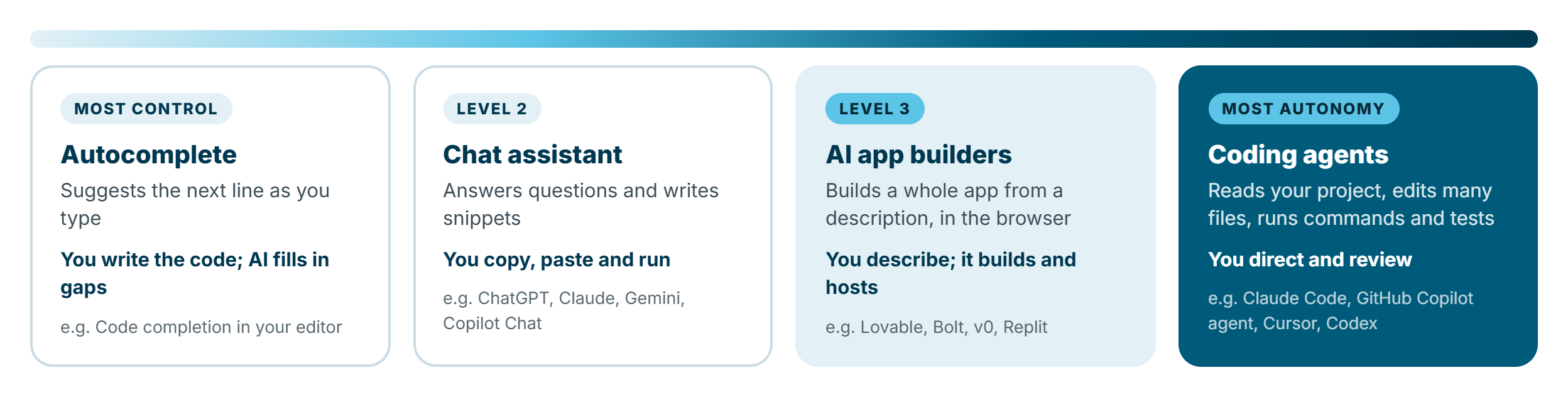
- Autocomplete: the AI suggests the next line as you type. You're still the one writing the code.
- Chat assistants: you ask a question ("write me a Python script that…") and copy the answer into your project.
- AI app builders: you describe an app in a browser and it builds, previews and often hosts it for you. This is where most beginners start.
- Coding agents: the AI works directly in your project folder. It can plan a change, edit many files, install packages and run tests. This is the most powerful option, and the one that needs the most supervision.
What vibe coding is not: it's not "no-code". There is code, and it's real. You just didn't type it. That difference matters later, because someone will eventually need to maintain, secure and fix that code. Usually that someone is you.
Why it matters (and why I'm excited about it)
I spend a lot of time with low-coders, pro-coders and students, and vibe coding narrows the gap between "I have an idea" and "I have a working thing" more than anything I've seen. Business analysts can build a working prototype instead of a 30-page requirements document. Students can see their ideas run in an afternoon. Small business owners can build the internal tools that SaaS products are too expensive or too generic to provide. I wrote about this in From Side Hustle to Main Gig: AI lets one person build what used to need a small team.
But speed cuts both ways. The same tool that builds your app in an hour can build a security hole in a second, confidently and without telling you.
The vibe coding loop
Every good vibe coding session follows the same rhythm, whatever tool you use:
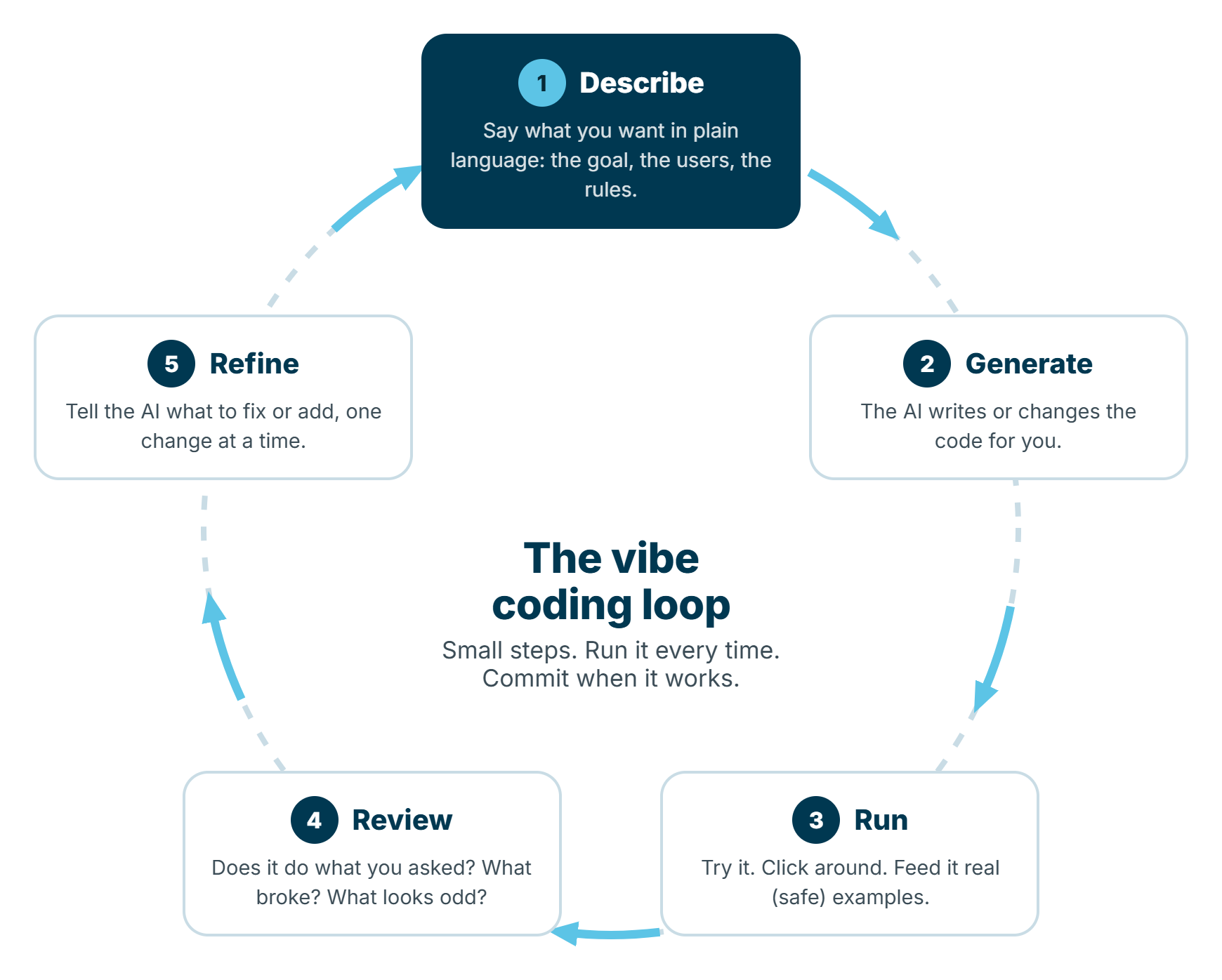
- Describe what you want: the goal, who will use it, and the rules it must follow.
- Generate: the AI writes or changes the code.
- Run it. Every time. Don't stack five changes and hope.
- Review: does it do what you asked? What broke? What looks odd?
- Refine: tell the AI what to fix or add, one change at a time.
The single biggest mistake I see beginners make is asking for everything at once ("build me a full CRM with logins, invoices, reports and email reminders"). The AI will try, it will produce something impressive-looking, and it will be very hard to fix when part of it doesn't work. Small steps, run every time, save when it works.
Choosing your first tool
You don't need to pay for anything to start, and you don't need to pick the "best" tool. Pick one that fits what you want to build:
| If you want to… | Start with | Why |
|---|---|---|
| Build a small web app you can share with a link | An AI app builder (e.g. Lovable, Bolt, v0, Replit) | Everything runs in the browser, with a live preview and one-click hosting |
| Automate something on your own computer (files, spreadsheets, data) | A chat assistant (ChatGPT, Claude, Gemini, Copilot) plus Python | You stay in control of what runs on your machine |
| Work on a real project with files and version control | A coding agent (e.g. Claude Code, GitHub Copilot's agent, Cursor, Codex) | It can read and change your whole project, run tests and explain what it did |
| Build inside Microsoft 365 or Power Platform | Copilot in Power Apps, Power Automate or Copilot Studio | Your organisation's security, data and governance already apply |
That last row matters if you work in a business. Vibe coding in a personal account and then pasting company data into it is how data leaks happen. If your organisation already uses Microsoft 365 or Power Platform, start there, and read The Ultimate Guide to Learning Power Platform for the low-code side of the same idea.
Your first vibe-coded project, step by step
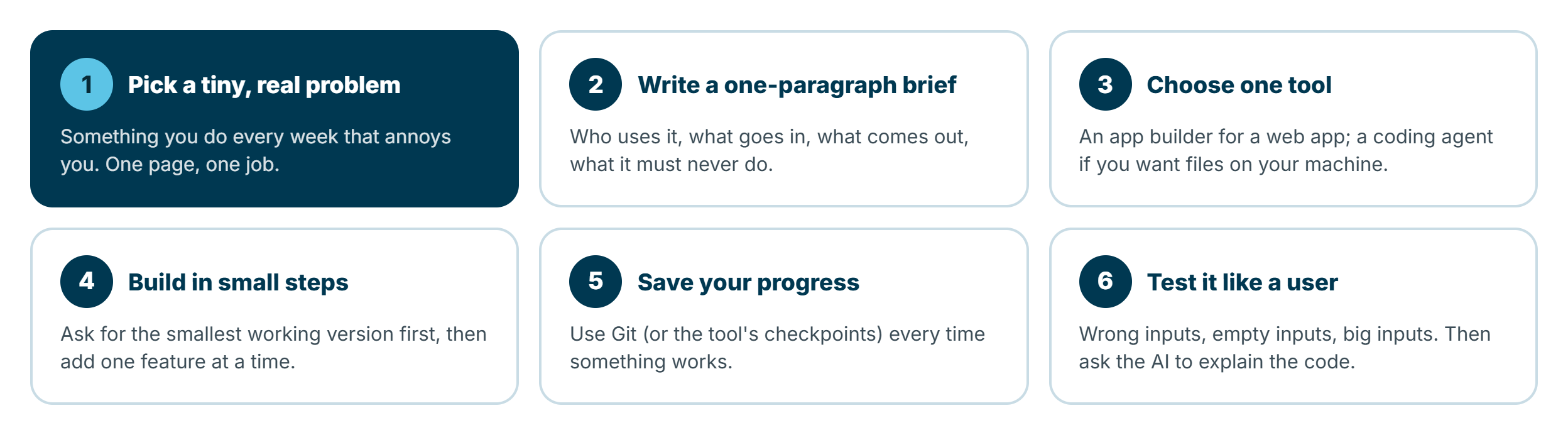
1. Pick a tiny, real problem
Choose something you actually do every week. "A page where I paste a list of names and it splits them into random teams" is perfect. "An app like Uber, but for tutors" is not a first project.
2. Write a one-paragraph brief
The quality of what you get back depends on the quality of what you describe. Before you open any tool, write down who uses it, what goes in, what comes out, and what it must never do. Here's a brief I'd give an AI app builder:
Build a simple web page for a lecturer to split a class into random teams.

Users: one lecturer, on a laptop. No logins needed.
Input: a text box where I paste student names, one per line, and a number for team size.
Output: the teams shown as cards, with a "Shuffle again" button and a "Copy as text" button.
Rules:
- If the names don't divide evenly, spread the extra people across teams (never a team of 1).
- Ignore blank lines and duplicate names, and tell me how many duplicates were removed.
- Nothing is saved or sent anywhere; everything stays in the browser.
Start with the smallest working version. Don't add extra features I didn't ask for.
Notice the last two lines. Telling the AI that nothing should leave the browser, and asking for the smallest working version, prevents two of the most common problems: unnecessary data collection and feature sprawl.
3. Choose one tool and stick with it
Switching tools halfway through a project usually means starting over. Use one tool until your first project works.
4. Build in small steps
Once the basic version runs, add features one at a time:
That works. Now add one thing only: a "Download as CSV" button under the teams.
Don't change anything else. When you're done, tell me which files you changed.
"Don't change anything else" and "tell me which files you changed" are two of the most useful phrases in vibe coding. AI tools love to "improve" things you didn't ask about.
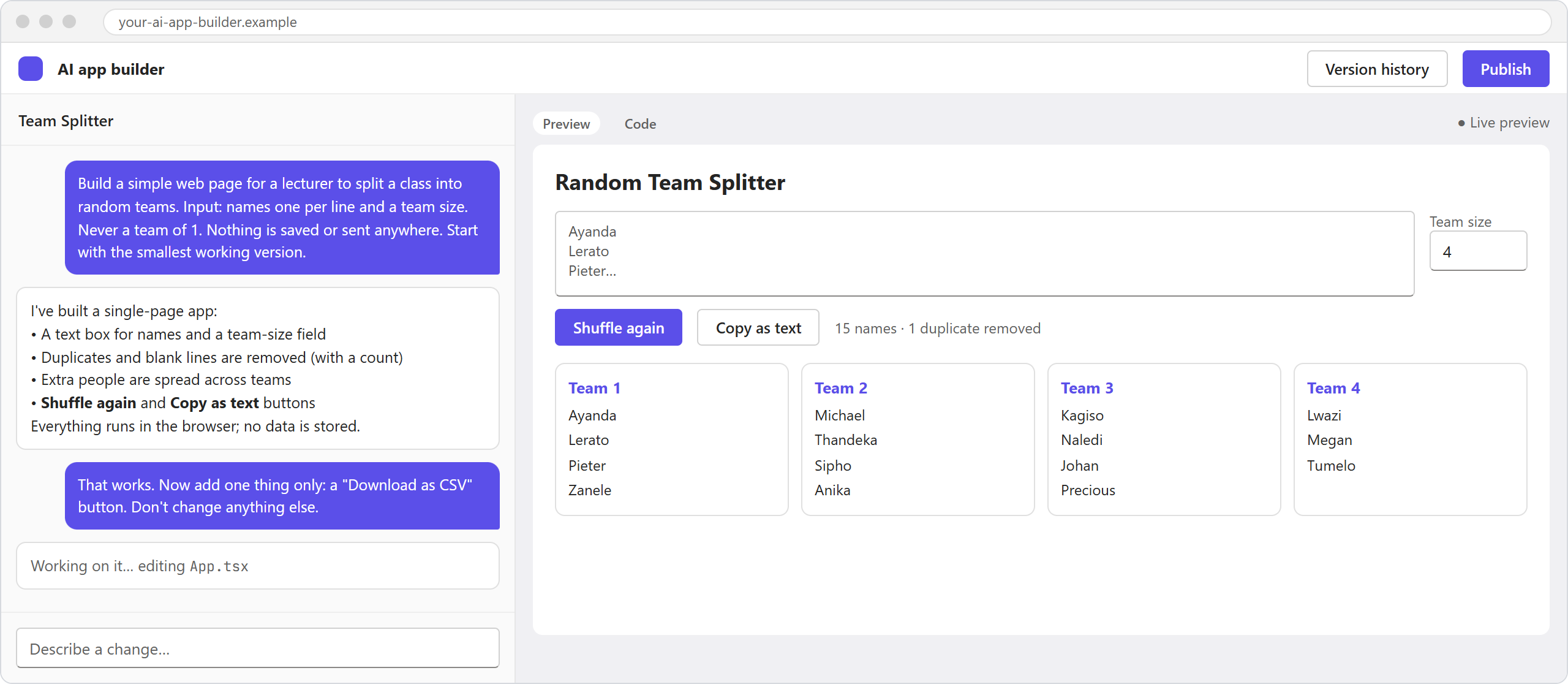
Illustration: an AI app builder, with the conversation on the left and a live preview of the team splitter on the right. Your screen may look slightly different.
5. Save your progress
Every time something works, save a version you can go back to. App builders usually have checkpoints or version history. If you're working with files, learn the basics of Git. You only need three commands to start:
git init                      # once, to start tracking the project
git add .                     # stage everything that changed
git commit -m "Teams page works with CSV download"
When the AI breaks something (and it will), you can roll back instead of trying to describe your way out of a mess.
6. Test it like a user, then ask it to explain itself
Try wrong inputs, empty inputs and very large inputs. Paste 500 names. Paste emojis. Leave the team size empty. Then ask the AI to explain its own code:
Explain how this app works as if I'm new to programming.
Walk me through each file, what it does, and anything that could go wrong.
Then list any security or privacy risks you can see.
You'll learn more from this one prompt than from an hour of tutorials, and it often surfaces problems the AI introduced without mentioning them.
Things to consider before you share it
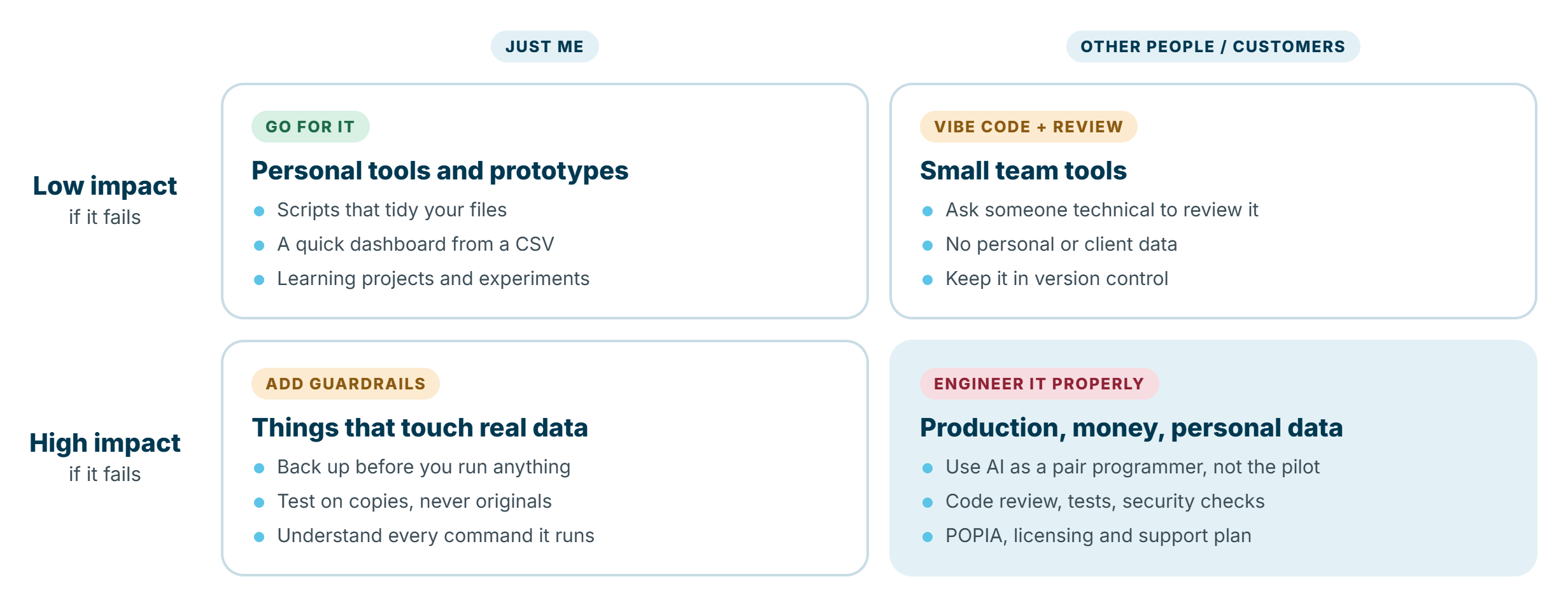
This is the part most vibe coding tutorials skip. Building something that works on your laptop is the easy part. The moment someone else uses it, or it touches real data, the stakes change. Two questions decide how careful you need to be: who will use it, and what happens if it goes wrong?
You still own the code
If it breaks at 2am, the AI isn't on call. If a customer's data leaks, "the AI wrote it" isn't a defence. Treat anything you vibe code as your code: you're responsible for what it does.
Secrets: never put keys in your code
AI tools will happily write your API key or database password straight into the code. If that code ends up in a public repository, automated bots can find and use the key within minutes. Keep secrets in an environment file that never gets committed:
# .env  (never commit this file)
OPENAI_API_KEY=sk-...
DATABASE_URL=postgres://...
# .gitignore
.env
node_modules/
__pycache__/
And if you ever pasted a real key into a chat, rotate it (generate a new one and delete the old one). Assume anything you've pasted into a prompt has left your control.
Data and privacy (POPIA)
In South Africa, the Protection of Personal Information Act applies to anything that collects names, ID numbers, contact details or anything else that identifies a person, whether a human or an AI wrote the code. Ask yourself:
- What personal data does this collect, and does it really need it?
- Where is it stored, and who can access it?
- Is it being sent to a third-party service (including the AI model itself)?
- What does the AI tool do with my prompts? Check its data and training settings, especially on free plans.
Test with made-up data. Never paste real client or student records into a prompt to "help the AI understand".
Security: AI writes confident code, not secure code
When I commented in ITWeb on a flaw in an AI coding tool earlier this year, the point I made was that attackers don't need to target one site manually; they target the framework footprint. AI-generated apps often look alike under the hood, so one common weakness can affect thousands of them at once. Three things to watch:
- Packages that don't exist. AI models sometimes invent package names. Attackers have started registering those made-up names with malicious code (sometimes called slopsquatting). Before installing anything, check that the package is real, popular and maintained.
- Trusting user input. Anything a user types should be treated as untrusted. Ask the AI explicitly: "validate all inputs and make sure nothing the user types is run as code or SQL".
- Unprotected pages. Admin screens and data endpoints are often left wide open in prototypes. If it's online, assume someone will find it.
Licensing and ownership
AI-generated code can include open-source libraries with their own licences, and app builders have their own terms about who owns what you build. If you plan to sell it or use it commercially, check the licences of the libraries in your project and the terms of the tool you used.
Costs
Free tiers run out. App builders, coding agents and hosting usually charge by usage, and an AI agent stuck in a loop can burn through credits surprisingly fast. Before you share something widely, know what it costs per month at ten users and at a thousand, and switch on usage limits or billing alerts.
Maintainability
Vibe-coded projects tend to grow in layers: each fix added on top of the last. After a few weeks, nobody, including the AI, fully understands it. Ask the AI to keep a short README up to date, to explain any major change before it makes it, and every so often to "review the project and suggest how to simplify it without changing what it does".
Here's the checklist I use before anything I've vibe coded leaves my laptop. If you can't tick a box, ask the AI to help you fix it, then check its work.
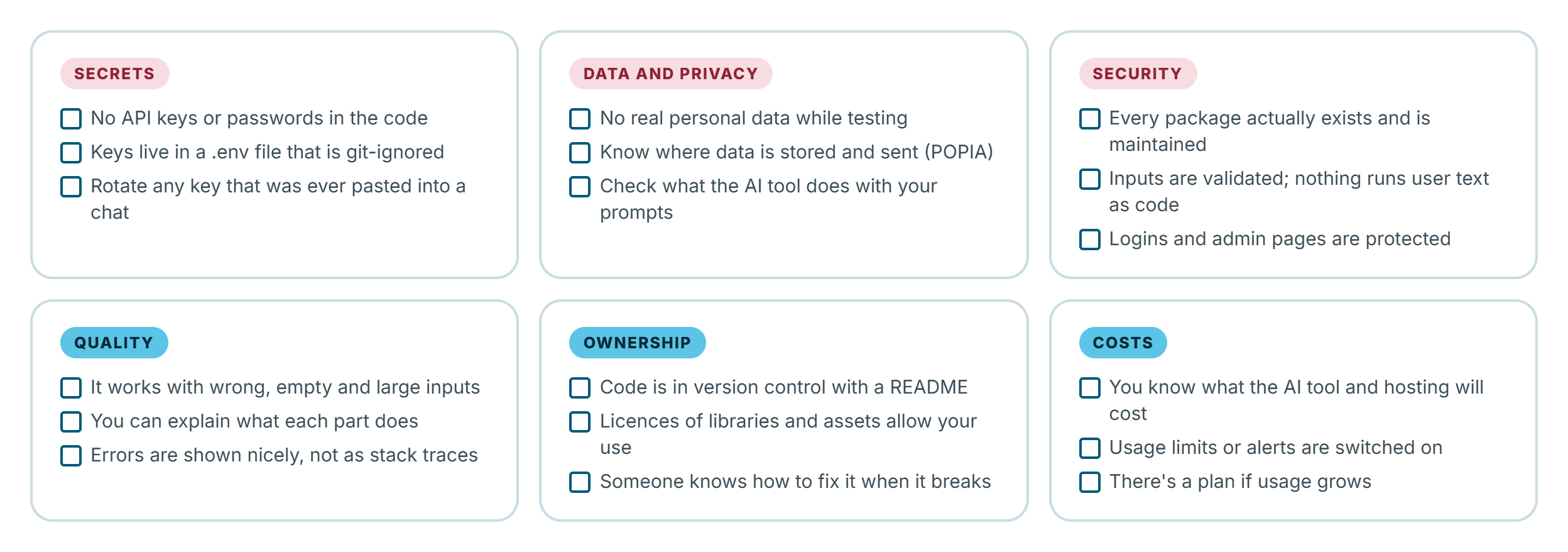
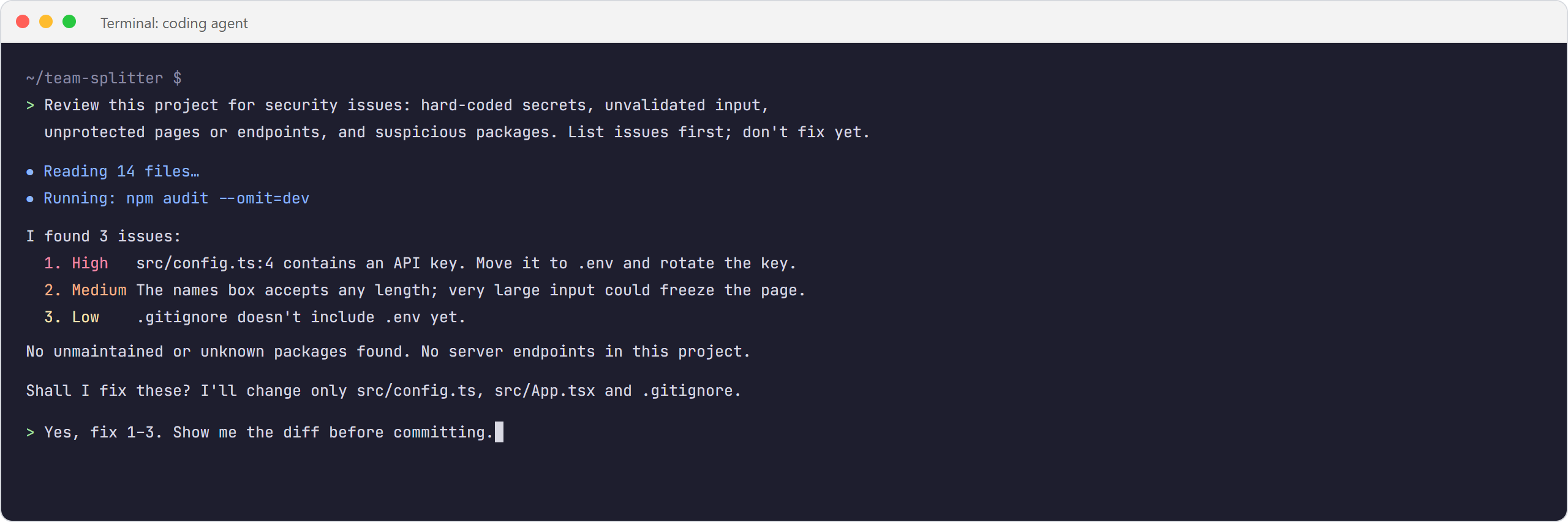
Illustration: a coding agent reviewing a project for security issues before fixing anything. Your screen may look slightly different.
When not to vibe code
Vibe coding is brilliant for prototypes, personal tools, learning, and internal tools with a small, forgiving audience. It's the wrong approach, on its own, for:
- Anything handling money (payments, invoicing, payroll).
- Regulated or sensitive data (health, financial, children's or student records).
- Production systems that other systems or many people depend on.
- Security-critical features like authentication, permissions and encryption.
That doesn't mean AI can't help with those. It means AI should be your pair programmer, not the pilot: a developer who understands the code designs the solution, uses AI to move faster, and reviews, tests and secures every change. The same applies in automation. In End-to-End: From Copilot Studio Agent to Production I walk through what it takes to move an agent from a working demo to something an organisation can safely rely on, and the same discipline applies to vibe-coded apps.
Prompts that make vibe coding safer
A few prompts I reuse constantly:
Before writing any code, ask me up to five questions about anything unclear in my request.
Make the smallest change that fixes this. Don't refactor or rename anything else.
Review this project for security issues: hard-coded secrets, unvalidated input,
unprotected pages or endpoints, and packages that are unmaintained or suspicious.
List the issues first; don't fix anything until I confirm.
Write simple tests for the main features, then run them and show me the results.
Update the README with: what the app does, how to run it, where data is stored,
and which environment variables it needs.
From vibe coder to developer
You don't have to become a software developer to vibe code. But every bit of understanding you add makes your AI-built tools safer and makes you far more effective with AI.
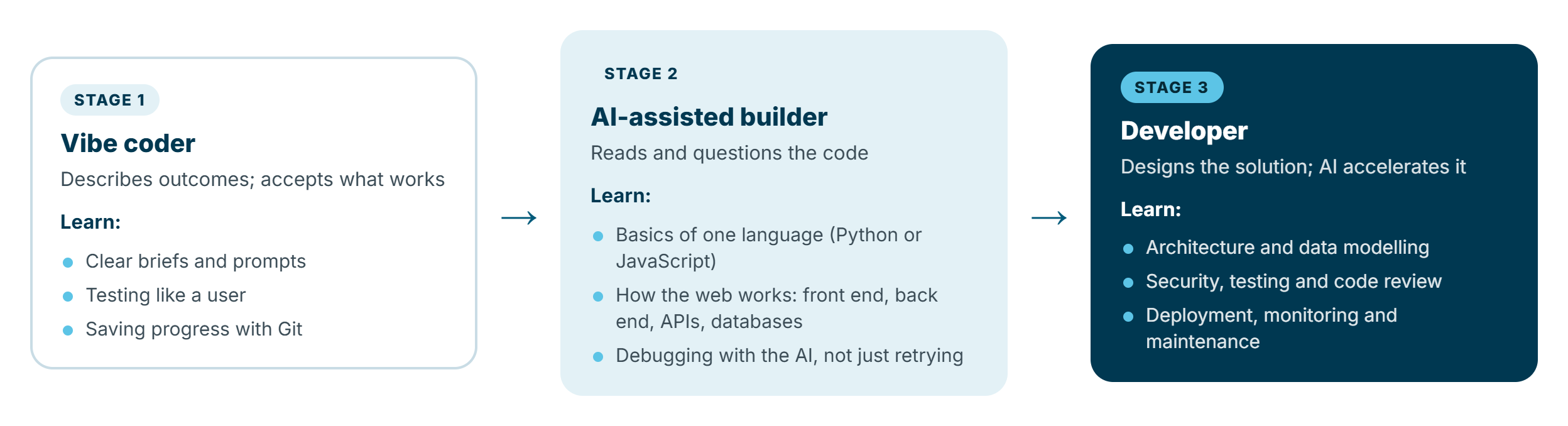
If you want to take the next step, learn the basics of one language. Python is a great start (my 5WH of Getting Started with Python is still a gentle introduction). Then learn how the web fits together: front end, back end, APIs and databases. Most importantly, get into the habit of asking the AI why it did something, not just what to do next. For a broader view of where these skills lead, see Mapping a Career in AI and Automation.
Summary
Vibe coding lets anyone turn an idea into working software by describing it in plain language. To do it well:
- Start tiny and work in the describe → generate → run → review → refine loop.
- Write a clear brief, including what the app must never do.
- Save progress every time something works, so you can roll back.
- Keep secrets out of code, test with fake data, and respect POPIA.
- Check what the AI installs and ask it to review its own work for security issues.
- Know when to stop: money, sensitive data and production systems need proper engineering, with AI as the assistant rather than the author.
Used this way, vibe coding isn't a shortcut around learning. It's one of the best ways to learn. Build something small this week, break it, fix it, and ask the AI to explain every part. You'll be surprised how quickly the code stops feeling like magic.