End-to-End: From Copilot Studio Agent to Production

Building an agent in Copilot Studio takes an afternoon. Getting that same agent into production, safely, with the right people using it and someone still looking after it six months later? That's a different story.
I presented this session, End-to-End Solutions: From Studio Agent to Production, on 8 September 2026 as part of Copilot: Zero to Hero – AI Supercharged, the second season of our free community series. The idea was to take everything both seasons had covered and turn it into one repeatable framework for shipping an agent. Because a demo is not a product, no matter how good the demo is.
Two seasons, one progression
Season 1 of Copilot: Zero to Hero ran from July to November 2025, every second week, online and free. It focused on the foundations: what Microsoft 365 Copilot is, Power Platform environments and an Azure AI landing zone, communication and change management, enabling Copilot chat in Teams, adoption (training, prompt tips and champions) and governance as an enabler.
Season 2, AI Supercharged (May to September 2026, 10 sessions), moved on to building: what agents are (retrieval, task and autonomous), safe Copilot Studio environments, designing agents, hands-on builds, multi-agent orchestration and MCP, security and lifecycle at scale, and extending with Azure AI Foundry.
The order is deliberate. Understand, get a safe environment, design, build, orchestrate, govern, extend. That ordering is the lifecycle.
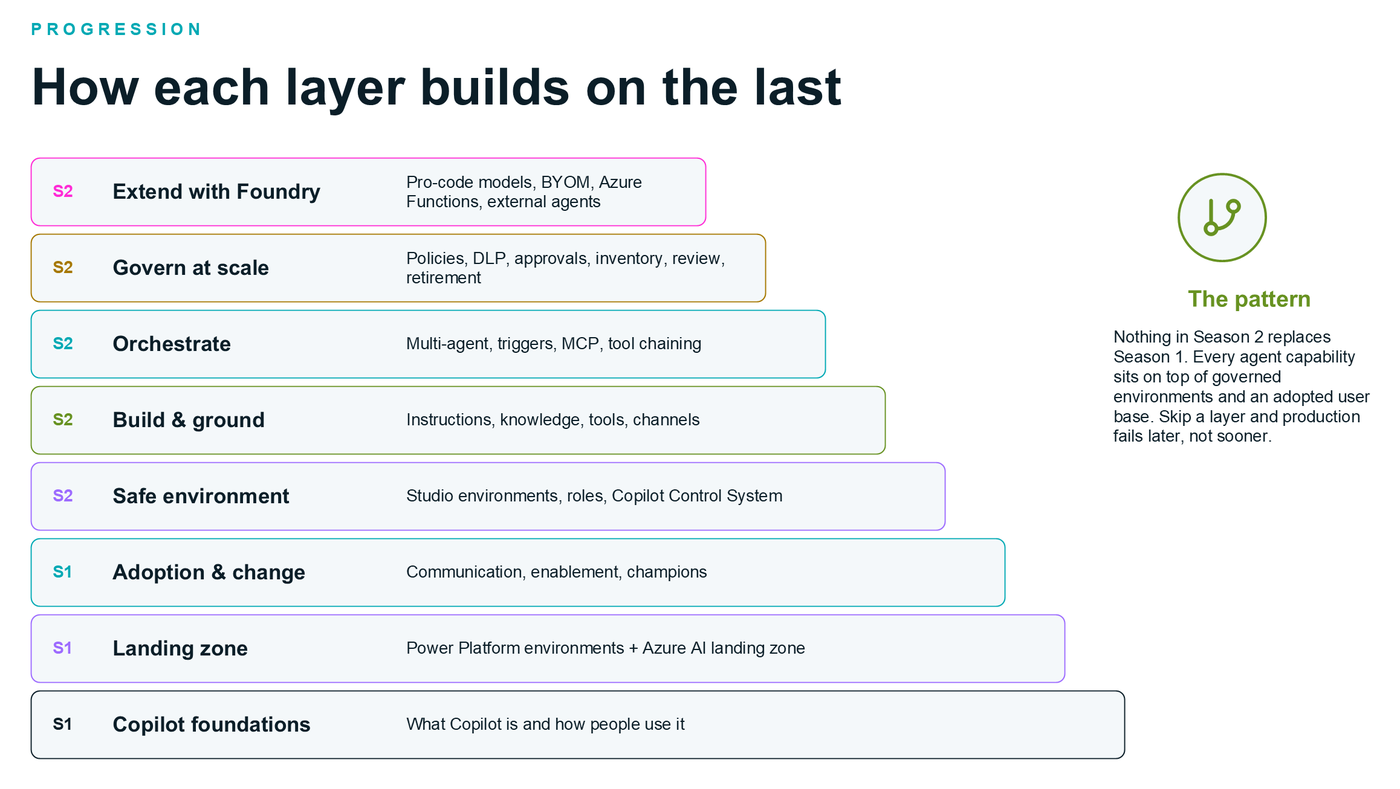
Read it bottom-up: every agent capability sits on governed environments and an adopted user base.
The key insight: nothing in Season 2 replaces Season 1. Skip a layer and production fails later, not sooner. Production readiness is a property of the whole stack, not of the agent alone.
The Z2H agent lifecycle: idea to production
Here's the framework the two seasons imply. Seven stages, looping.
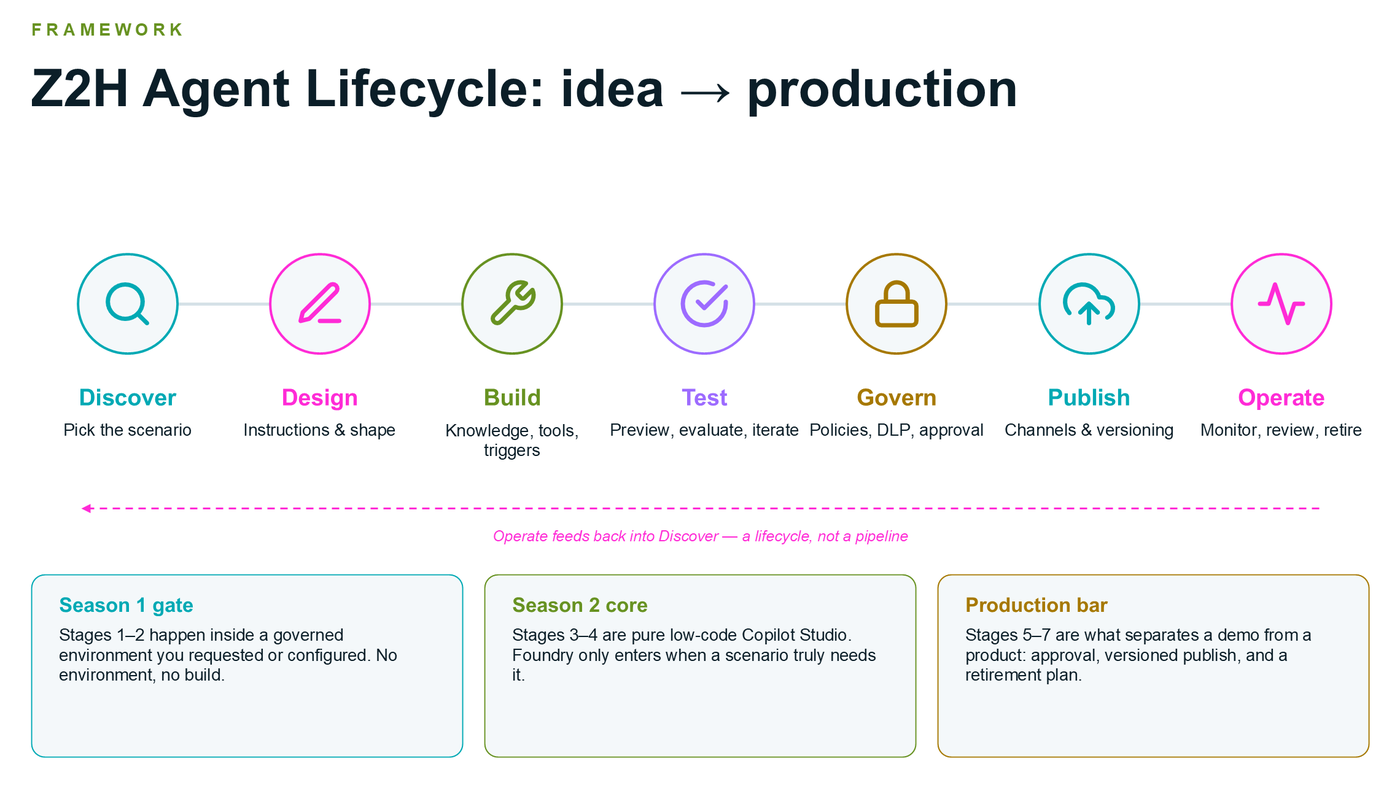
Operate feeds back into Discover. It's a lifecycle, not a pipeline.
The stages group into three gates:
- Season 1 gate (Discover, Design): these happen inside a governed environment you requested or configured. No environment, no build.
- Season 2 core (Build, Test): pure low-code Copilot Studio. Foundry only enters when a scenario truly needs it.
- Production bar (Govern, Publish, Operate): this is what separates a demo from a product. Approval, a versioned publish and a retirement plan.
1–2. Discover and design
Discover starts from a real, repetitive, well-bounded task, not from the technology. Classify the agent (retrieval answers questions, task does something, autonomous is triggered and multi-step), decide the builder path (Copilot Studio first, Foundry only for pro-code needs), confirm the environment, maker role and allowed connectors exist, and name the users, the channel they live in and the success measure.
Design is where most production failures are avoided. Write system instructions that cover role, scope, tone, what the agent must never do and how it hands off. List your knowledge sources and their sensitivity, your tools (connectors, flows, REST APIs, MCP servers, other agents) and your triggers. Then sketch the happy path and the three most likely failure paths before you build anything.
3–4. Build and test
Build in Copilot Studio: paste in the designed instructions (and keep them versioned outside Studio too), scope knowledge narrowly, add tools like sending email or calling an API, and set up triggers and channels, with Teams and web from day one.
Test before anyone else sees it. A few habits that make a big difference:
- Use the preview/test pane on every change. The draft is invisible to users until published.
- Test the three failure paths you designed, not just the happy path.
- Probe scope with off-topic questions, sensitive data and prompt injection hidden in a document.
- Verify each tool with real test-environment credentials and the right authentication mode.
- Use agent evaluations. They can be triggered automatically via the Copilot Studio connector in Power Automate.
- Check web search and other defaults, and switch off what the scenario doesn't need.
- Record your results. This is the evidence governance will ask for.
5–7. Govern, publish and operate
Govern: confirm agent policies and allowed makers, run a DLP/data-boundary check on every connector and knowledge source, route through the approval flow with your test evidence, register the agent in the inventory, and assign an owner and a review date.
Publish: run the readiness check, create the version, attach channels, share with a pilot group first and only then the organisation catalog. Every later change is a draft until republished.
Operate: monitor usage and conversation analytics, review transcripts for drift, refusals and escalations, iterate, and retire agents nobody uses. Then feed what you learnt back into Discover.
The production readiness checklist
If you only take one thing from this post, take this. Use it as the gate between testing and publishing. If any line is unticked, the agent is a demo, not a product.
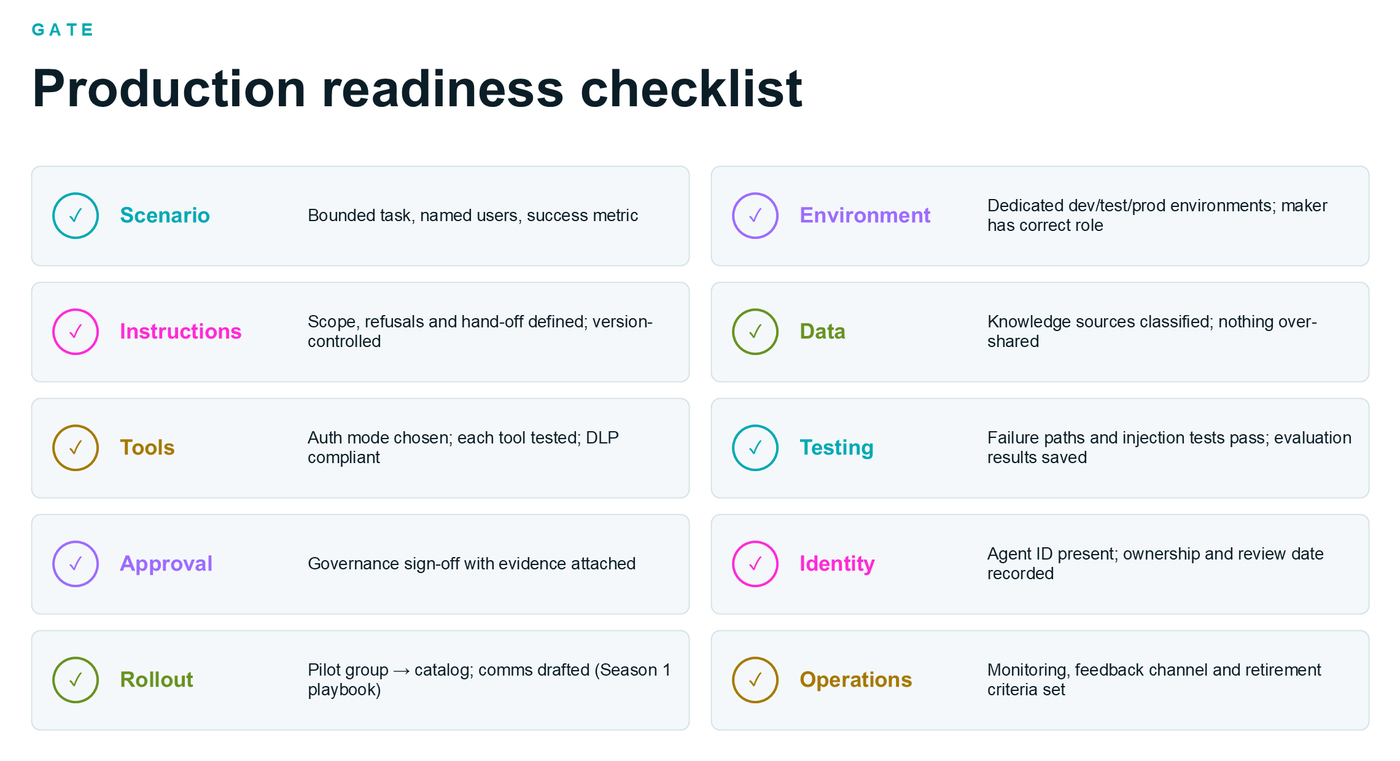
Ten ticks between "it works on my preview pane" and production.
One note from the session: from July 2026, Copilot Studio automatically creates a Microsoft Entra Agent ID for every new agent, so identity should be there by default. Verify it rather than create it.
Publishing, step by step
Following the Microsoft Learn publish flow (as of August 2026):
- Finish the draft. The agent needs a name, description and instructions. Copilot Studio won't publish without all three.
- Test in preview. Run your scripted tests and evaluations on the final draft.
- Set authentication in Settings → Security: Authenticate with Microsoft (Teams/M365 Copilot), Authenticate manually (other channels), or No authentication (no user-credential tools). Do this first, because it determines which channels you can connect.
- Open the Publish dialog and review the agent details.
- Select and configure channels. Channels blocked by your organisation's data policies or admin settings show as restricted.
- Publish and wait. A new live version is created. If it fails, fix the reported issue and retry.
- Share or add to the catalog, either with a pilot group or submitted to the organisation catalog for admin approval.
- Test live, then republish for every change. Edits to the draft don't affect the live version until you publish again.
An important gotcha: agents published to Microsoft 365 Copilot and Teams are not automatically deployed org-wide. Sharing or catalog submission is the last mile.
Treat environments like software, not like a chatbot
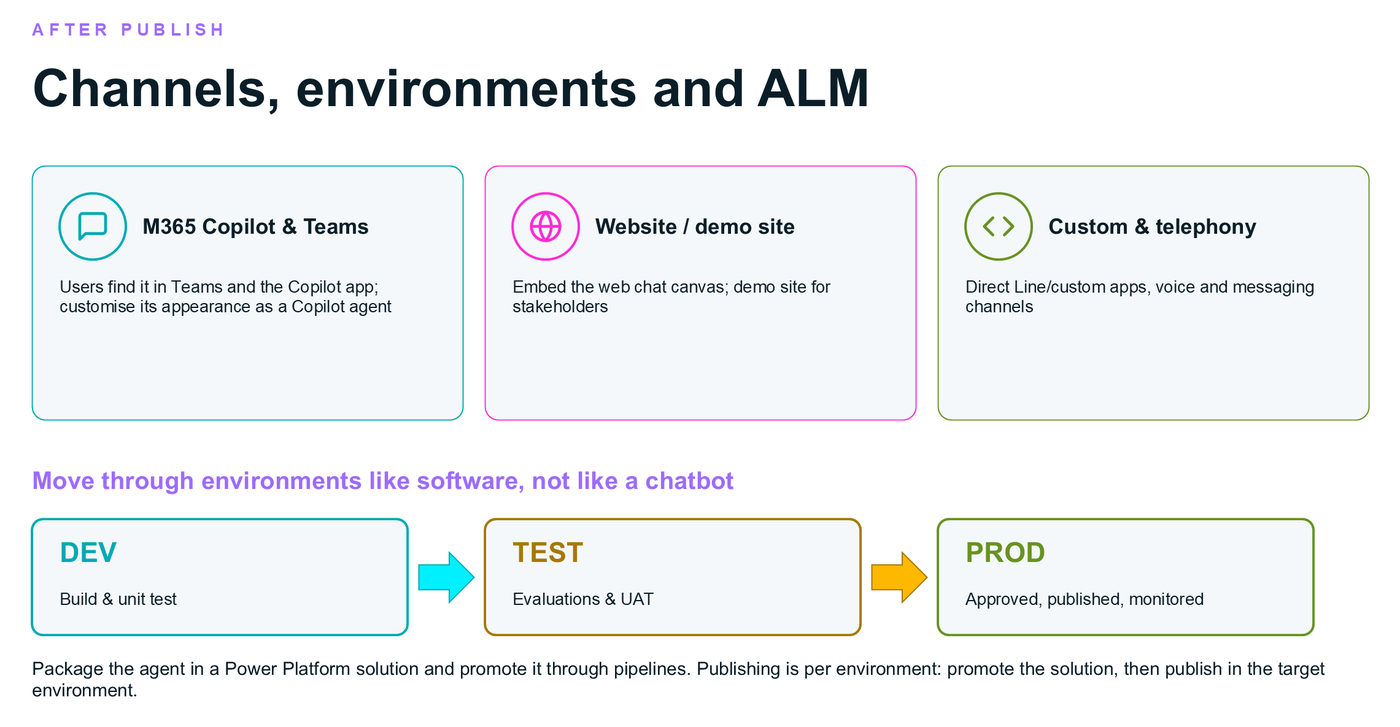
Dev for building, test for evaluations and UAT, prod for approved, published and monitored.
Package the agent in a Power Platform solution and promote it through pipelines. Publishing is per environment: promote the solution, then publish in the target environment. It's exactly the Season 1 landing-zone principle, applied to agents.
And then there's the bill
The last part of the session covered a summary of the Microsoft Copilot Credits Guide (September 2026), because the most common post-production surprise is cost. (One slide was simply titled "BAIE Duur!". For the non-Afrikaans speakers: "very expensive!")
Copilot Credits are the usage-based currency for AI work across Microsoft. You can pay-as-you-go at $0.01 per credit, or pre-purchase a one-year pool (P3) with discounts from 5% (300k credits) up to 20% (300M credits).
Source: Microsoft Copilot Credits Guide, September 2026.
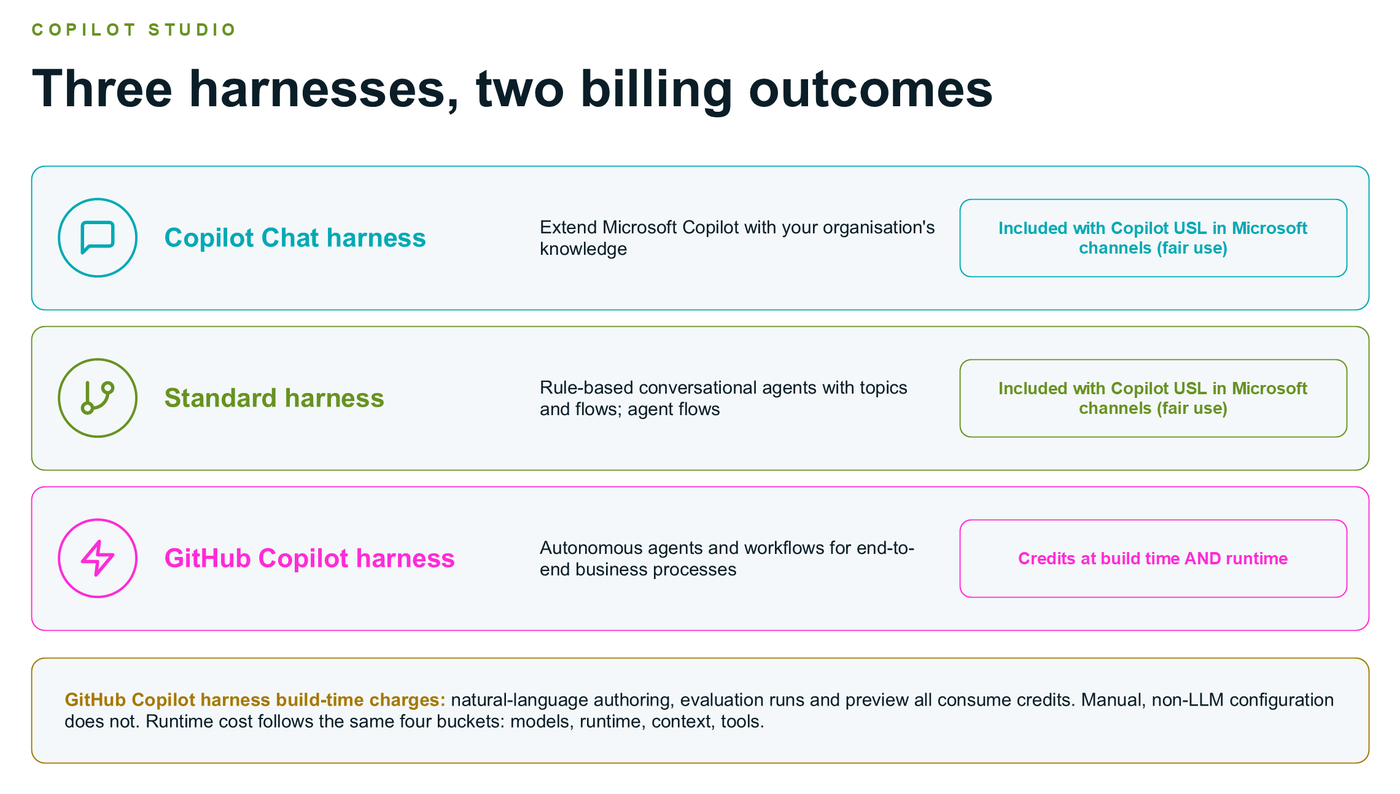
The big design implication is the harness. Per the guide, the Copilot Chat and Standard harnesses are included with a Copilot user licence in Microsoft channels (within fair use), while the GitHub Copilot harness consumes credits at build time and runtime, including evaluations, previews and natural-language authoring. So: pick the harness before you pick the budget, and set spend policies and thresholds in the Microsoft 365 admin center before your pilots, not after. This summary doesn't replace the Product Terms or licensing guides, so check those for your own scenario.
Conclusion
Build it. Govern it. Ship it. Keep it alive.
The foundations (governed environments and adopted users) are prerequisites, not options. Copilot Studio covers most scenarios, and Foundry is the extension, not the default. And publishing isn't a button, it's a lifecycle: readiness, version, channels, share, monitor, republish.
Recordings and the schedule are at copilotzerotohero.co.za, the repo is at github.com/warrendt/CopilotZ2H, and the official publish flow lives in the Copilot Studio docs.