Unit Testing in Power Automate Flows

Unit testing is a crucial aspect of software development, helping developers ensure that individual components of their code function as expected. But what about when you’re working with low-code or no-code automation platforms like Power Automate? Can you apply the same principles of unit testing to ensure the reliability of your automated workflows and processes?
In this blog post, we’ll delve into the fascinating world of unit testing in Power Automate, exploring how you can systematically validate and verify the functionality of your flows and connectors. Whether you’re a seasoned developer or someone just starting their journey in automation, understanding unit testing in Power Automate can significantly improve the quality, stability, and maintainability of your automated solutions. So, let’s embark on this journey to unlock the secrets of unit testing in the world of low-code automation.
What is Unit Testing?
Unit testing is a software testing technique used in software development to evaluate the individual components or units of a program in isolation. In unit testing, a “unit” typically refers to the smallest testable part of a software application, such as a function, method, or class. The primary goal of unit testing is to ensure that each unit of code performs as expected and meets its specified functionality.
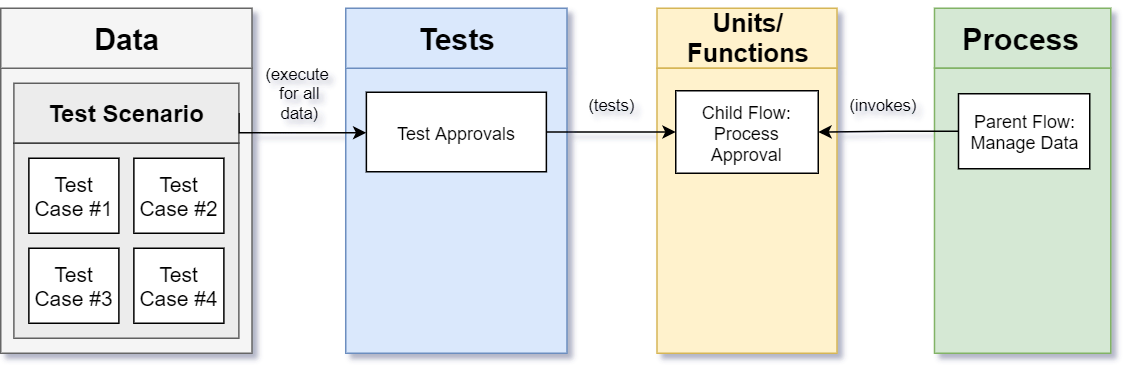
So in this case, based on the image above, Process Approval would refer to a function (or reusable Child Flow) that has been created in your solution and would need to be tested independently to the rest of the code. You could have multiple test scenarios and cases related to a specific unit of code, written as unit tests. In this instance, you’d want to create child flows that retain a single responsibility – calculating or processing a single piece of information. Splitting out designs to be granular and modular in the Power Platform can be costly in terms of performance and cost so it is definitely something that needs to be carefully considered during the design phase of the project.
Unit testing is generally the first step in the testing process and is usually followed by Integration Testing:
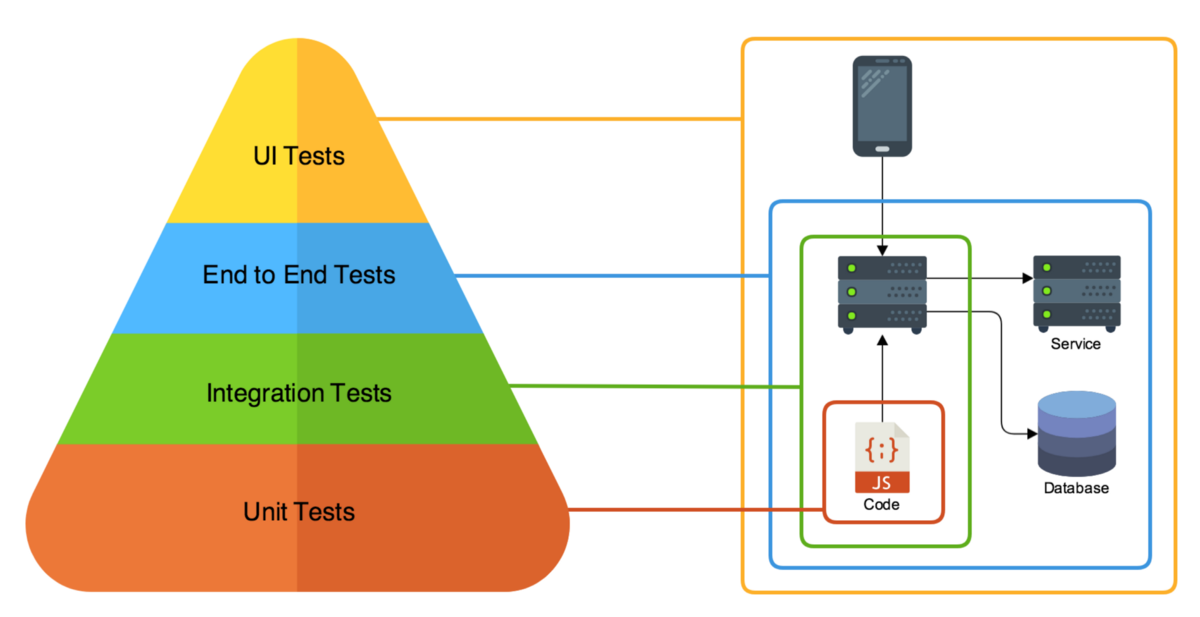
Benefits of Implementing Unit Testing in Power Automate
Unit testing is very dependent on the discipline of the developer to ensure that the development allows for parts of the solution to be tested as units of code. If that was not catered for in the development process, unit testing is almost sure to fail.
Building a standardised test framework that allows you to accept all test data in an Excel spreadsheet (for example) and runs the test for each record with the output being recorded to another data source (either SharePoint or Excel, for example) would allow for:
- Faster testing cycles
- More repeatable testing
- More rigorous testing
- Faster error and issue detection
- Auditing and recording of all successes and failures
- Robust supporting capability enablement
Things to Consider When Testing Flows
Unit testing in Power Automate does not look exactly the same as it does in traditional software development. Some of the challenges you are likely to run into include:
- Visual workflows: the logic lives in actions, conditions and scopes rather than in functions, so the flow needs to be designed in a way that allows those pieces to be called independently (child flows work well for this).
- External dependencies: most flows rely on connectors, APIs, databases and other services, which makes it difficult to test the logic in true isolation.
- Asynchronous operations: approvals, delays and other time-dependent steps can make tests slow or unpredictable.
- Limited built-in tooling: there is no native test framework in the platform, so you will need to build your own harness (like the Excel/SharePoint-driven approach described above).
What to Test
When identifying units of code within your flows, the following are good candidates:
- Data operations: transformations, filtering and calculations
- Condition logic: the different branches of conditions and switch statements
- Integration points: calls to external services and APIs
- Error handling: exception handling, retries and the paths taken when something goes wrong
Make sure that the test data covers more than just the happy path. Include scenarios like invalid or missing input data, unexpected data formats, authentication failures and throttling (rate limiting) responses so that you can confirm the exception handling behaves the way you expect.
Managing Test Data and Results
- Keep test data separate from production data, ideally in a dedicated test environment.
- Use anonymised or synthetic data rather than copies of real (sensitive) records.
- Clean up any data created by the tests once the run has completed so that the next run starts from a known state.
- Record the outcome (pass or fail) of each test case along with the expected and actual results, so that failures can be traced and trends can be monitored over time.
- Use clear naming conventions for test flows and keep them in the same solution as the flows they test so that they move through environments together.
Conclusion
Unit testing could contribute greatly to an automation strategy/lifecycle but it cannot work without adoption by developers or without a strategy. Unit testing is something to be considered in design phases already. Retrofitting a solution to include unit testing often results in more rework and affects the profitability of projects if it is not done ahead of time. Unit testing should not be the only form of testing that is conducted but it should be an essential part of any testing process, alongside integration testing. It is important for an automation team to have a unified and standardised testing strategy in place.