Ensuring Center of Excellence (COE) Control of Apps and Automate Flows

One of the biggest challenges in the Power Platform is maintaining control of the environments with the necessary visibility, especially when faced with the risk of orphaned artefacts (apps/flows without owners – possibly because the owner has left the organisation and the user account associated no longer exists).
The solution to this would be to assign ownership of all apps and flows in an environment to a service account or user group that contains users who should have visibility of what is happening in the environment. This user group would be a group of users who do not require elevated permissions. Elevated permissions allow access to the tenant and multiple other environments which goes against the “least access necessary” principle and is a GDPR (among other compliance regulations) violation.
Assigning a group or account to the flows and apps can be done on a recurring basis (daily recurrence is recommended).
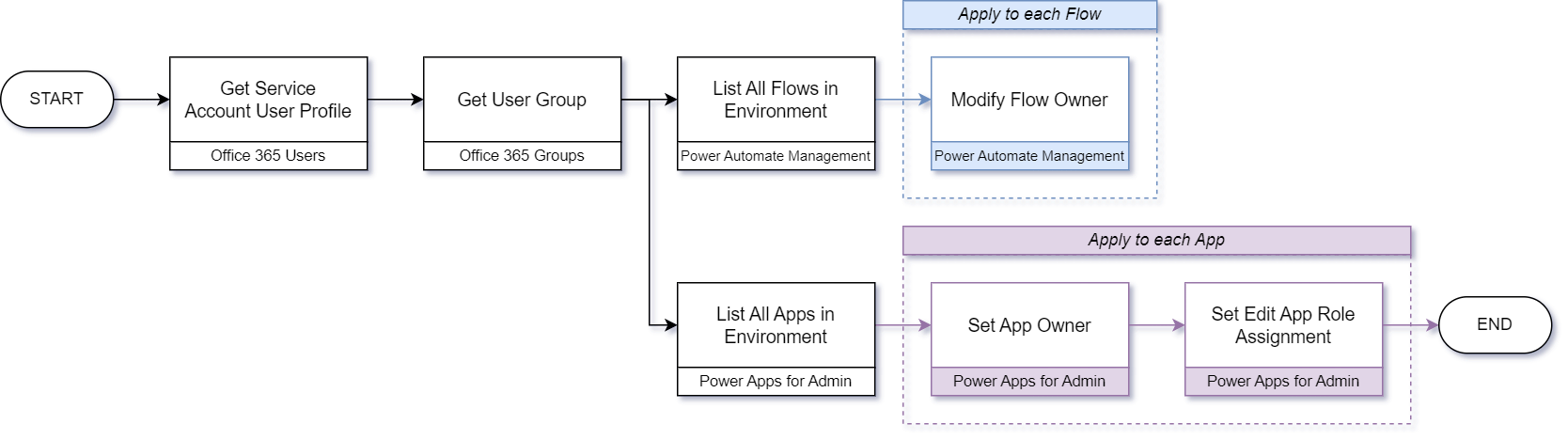
This solution does not require any additional licensing as none of the connectors are premium – all connectors used in this flow are standard connectors:
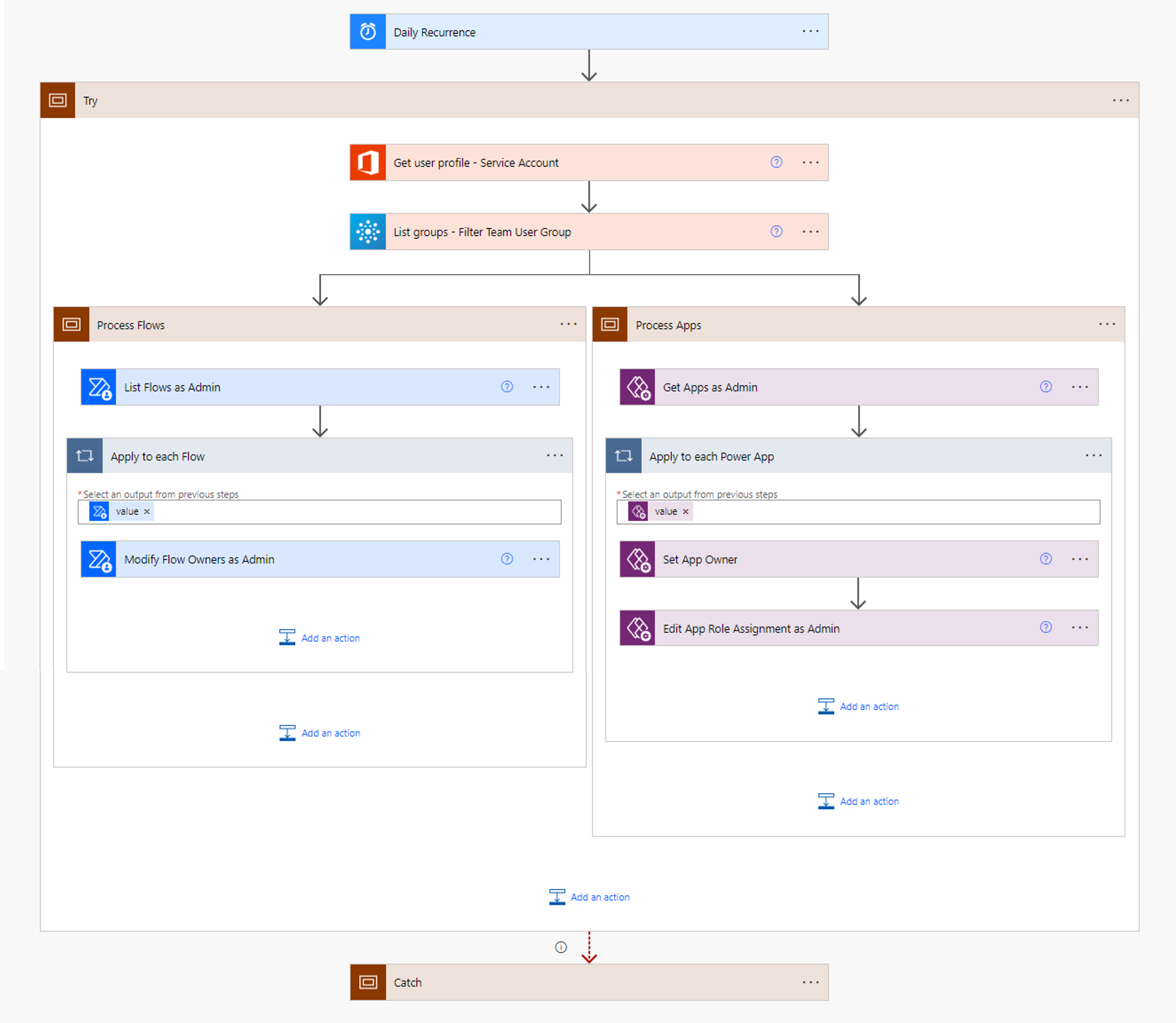
The flow above assigns groups (of users) and individual users (service principal accounts) to apps and flows. Depending on your use case, you can reduce some of the actions in the flow to only work with the roles relevant to your use case.
Retrieve Service Account/User Group for Use
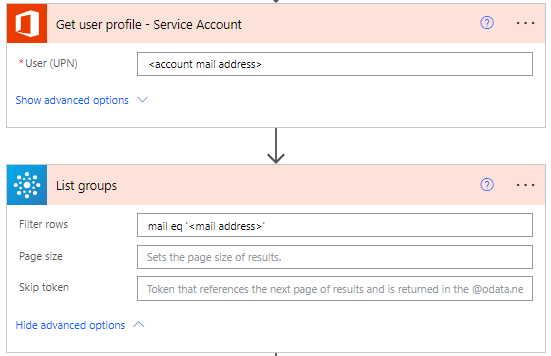
To retrieve the service account profile and/or the user group, make use of the following configuration on the relevant actions:
Set App Owner & Role Assignment
Once you’ve retrieved the user/group, you’ll want to set the owner and add a role assignment per app, which can be done as follows:
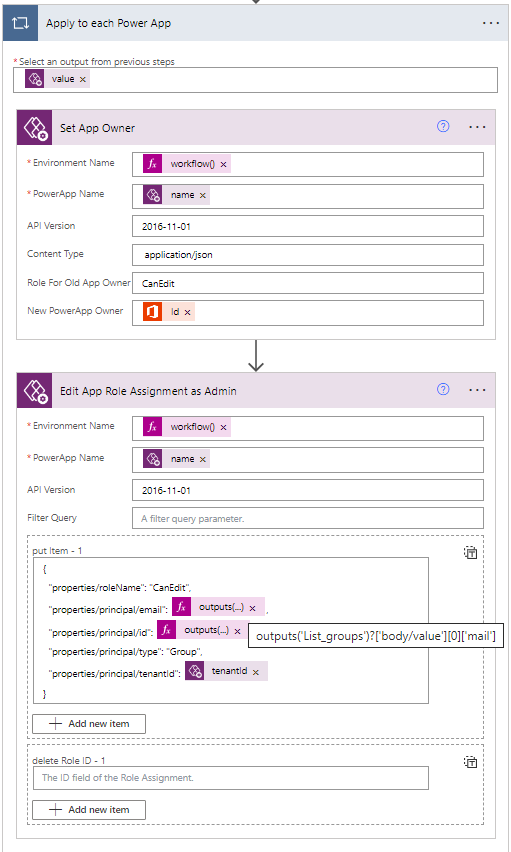
The expression used to get the environment is as follows:
workflow()['tags']['environmentName']
The body of ‘put item’ is as follows:
{
  "properties/roleName": "CanEdit",
  "properties/principal/email": outputs('List_groups')?['body/value'][0]['mail'],
  "properties/principal/id": outputs('List_groups')?['body/value'][0]['id'],
  "properties/principal/type": "Group",
  "properties/principal/tenantId": items('Apply_to_each_Power_App')?['properties/owner/tenantId']
}
If you are using a user instead of a group, change the principal type to ‘User’.
Modify Flow Owners
The same principle can be applied to flows.
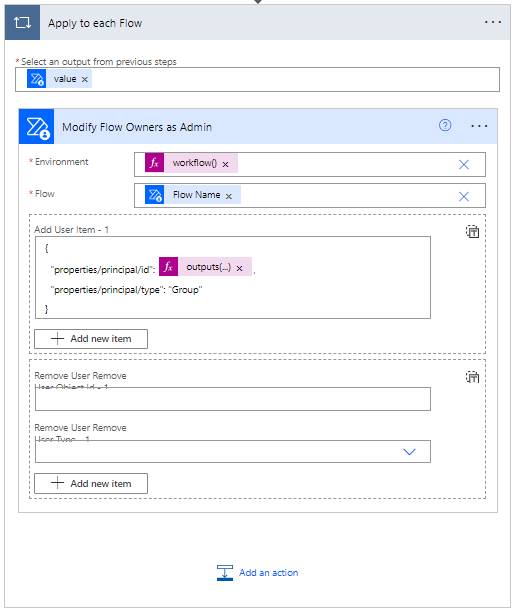
The expression used to get the environment is as follows:
workflow()['tags']['environmentName']
The body of ‘add user item’ is as follows:
{
  "properties/principal/id": outputs('List_groups')?['body/value'][0]['id'],
  "properties/principal/type": "Group"
}
If you are using a user instead of a group, change the principal type to ‘User’.
Your flow should now be connected correctly. Don’t forget the exception handling!
Keeping Ownership Under Control
Reassigning ownership on a schedule solves the immediate problem of orphaned apps and flows, but it works best as part of a broader governance approach:
- Assign a secondary owner: apps and flows should have a backup owner (or the CoE group) so that work can continue when the primary owner is unavailable or leaves the organisation.
- Review ownership regularly: confirm on a regular basis (quarterly, for example) that owners are still correct and still active.
- Have a transfer process: agree how ownership is handed over when someone changes roles or leaves, rather than relying on the clean-up flow alone.
- Export regularly: keep exports (or solution backups) of business-critical apps and flows.
If you haven't already, take a look at the Microsoft CoE Starter Kit, which includes dashboards of platform usage as well as processes that detect orphaned resources and notify the relevant people. The flow in this post can complement the Starter Kit by making sure that the CoE group always has access to what has been built in an environment.