Copilot in Power BI: What It Can and Can't Do for Report Builders

"Can't Copilot just build the report?" If you build Power BI reports for a living, you've probably heard that question from a manager in the last year. The honest answer is: it can do a surprising amount, it can't do some things people assume it can, and how well it works depends far more on your semantic model than on your prompts.
In this post I'll go through every Copilot experience in Power BI as it stands in October 2026, what you need to switch it on (including a step South African organisations can't skip), how to prepare a model so Copilot gives good answers, what it costs in capacity, and where its limits are.
The Copilot experiences
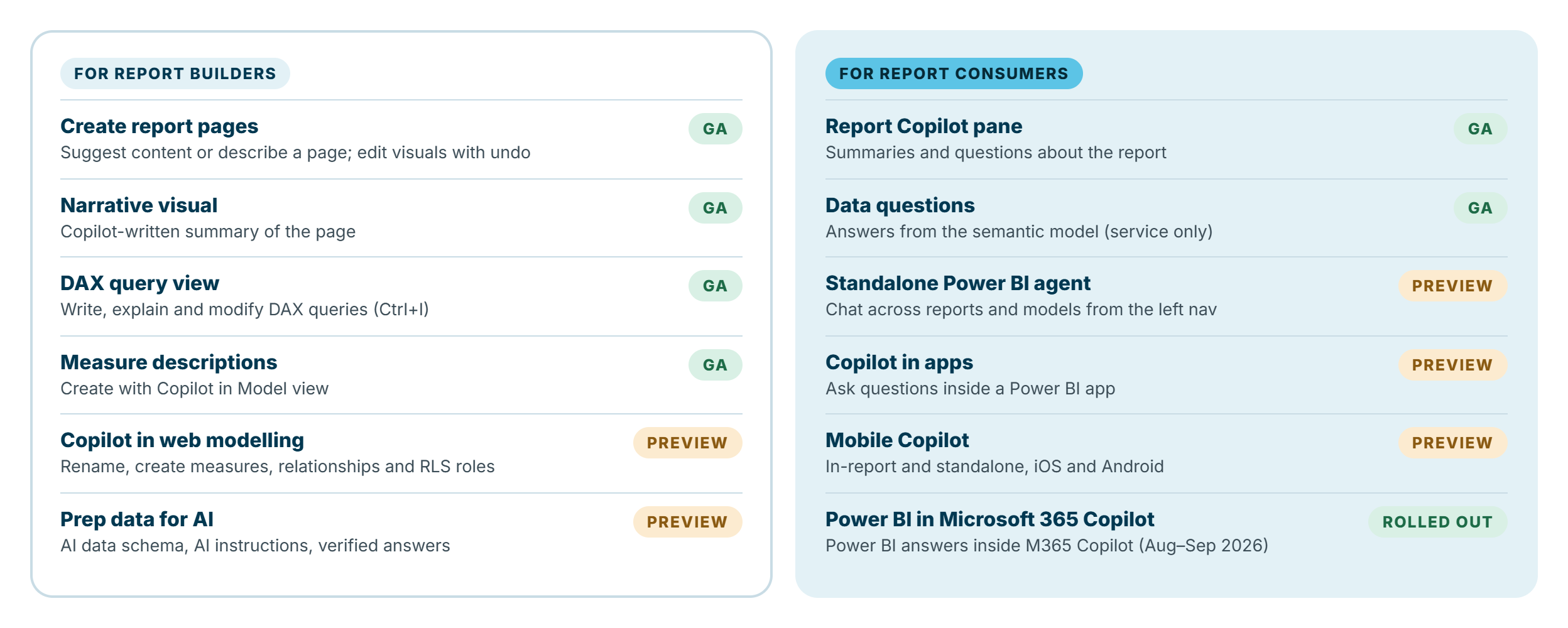
"Copilot in Power BI" isn't one feature. It's a family of experiences, some aimed at report builders and some at the people who read reports. Here's what's available, and whether each is generally available or still in preview, as at October 2026:
For report builders
Create report pages (GA). In Desktop or the service (edit mode), open the Copilot pane and either select Suggest content for this report or describe the page you want. Copilot builds the page and you can keep asking it to add, change or remove visuals, with undo and redo. It's an excellent way to get a first draft of a page, especially on a model you don't know well.
Narrative visual (GA). Add the Narrative visual from the Visualizations pane and choose Create a narrative with Copilot. It writes a summary of what's on the page. You change the text through prompts rather than editing it directly, and viewers need to refresh it when filters change.
Copilot in DAX query view (GA). Press Ctrl+I in DAX query view to write, explain or modify a DAX query in plain language. Copilot checks the syntax of what it generates and retries once if it's wrong; changes to an existing query show as a diff you can keep or discard. This is, for me, the most useful Copilot feature for experienced report builders. It's fast for scaffolding queries and genuinely good at explaining someone else's DAX.
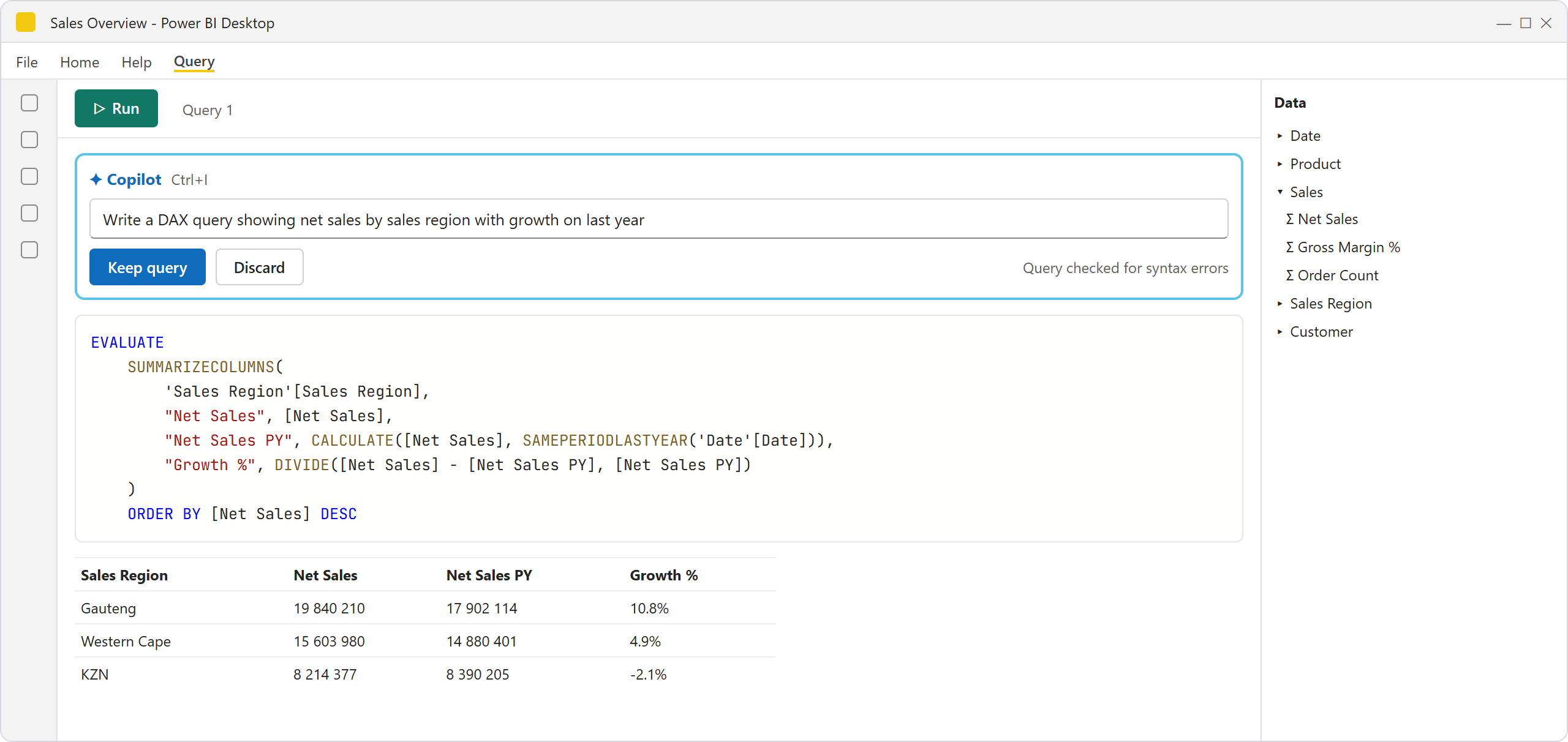
Illustration: Copilot in DAX query view writing a query from a plain-language request. Your screen may look slightly different.
Measure descriptions (GA). In Model view, select a measure and choose Create with Copilot under Description. It's a quick way to document a model, and those descriptions in turn make Copilot better (more on that below).
Copilot in web modelling (preview). In the service, Copilot can analyse a model and, with your permission, rename objects, create measures, relationships and RLS roles, suggest descriptions and fields to hide. It creates a restore point before making changes.
Prep data for AI (preview). Tools to tell Copilot how to interpret your model. Covered in detail below.
For report consumers
Report Copilot pane (GA). Readers can ask for a summary of a page or the whole report, or ask questions about what they're looking at.
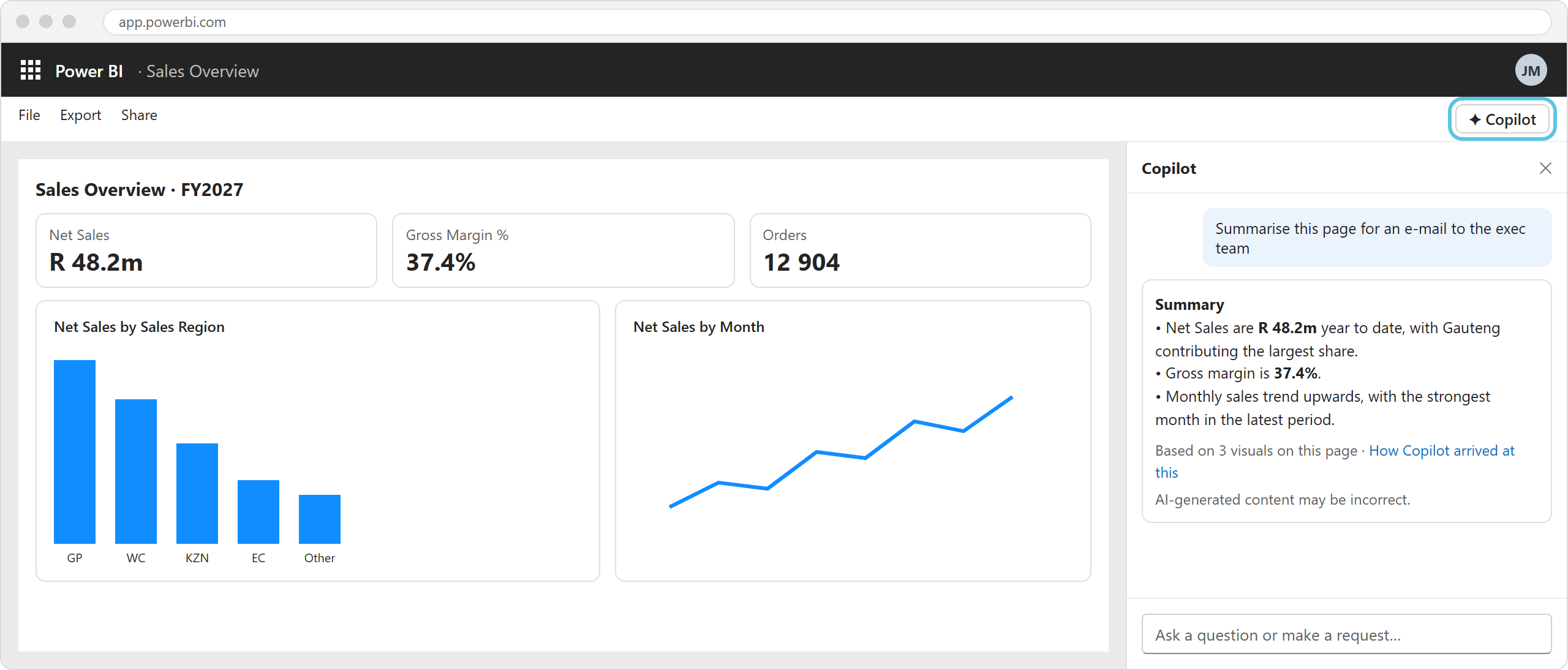
Illustration: the Copilot pane summarising a report page. Your screen may look slightly different.
Data questions (GA, service only). Copilot answers questions directly from the semantic model, writing DAX on the fly. You can see how it arrived at the answer, and with the newer Fabric IQ option it reasons in several steps and shows the DAX it ran.
Standalone Power BI agent (preview). A full-screen Copilot in the left navigation that searches across the reports and models you have access to. It has been on by default since September 2025 for tenants that already had Copilot enabled.
Copilot in apps and on mobile (preview). Ask questions inside a Power BI app, or in the iOS and Android apps.
Power BI in Microsoft 365 Copilot. Rolled out in August–September 2026. Users with a Microsoft 365 Copilot licence can get Power BI answers inside M365 Copilot, subject to their normal Power BI permissions.
What you need to switch it on
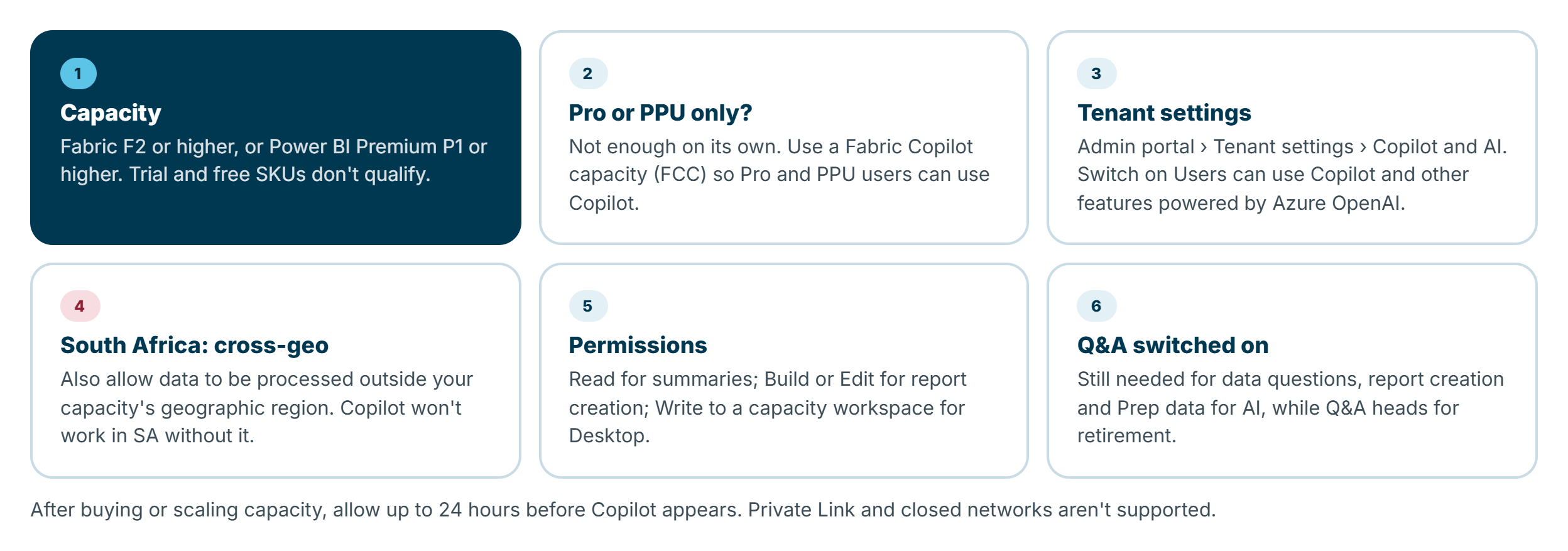
Capacity. Copilot needs a paid Fabric capacity (F2 or higher) or Power BI Premium (P1 or higher). The old F64 minimum was dropped in 2025, which put Copilot within reach of much smaller organisations. Trial capacities and free SKUs don't qualify, and after buying or scaling capacity it can take up to 24 hours to appear.
Pro and PPU users. A Pro or Premium Per User licence on its own isn't enough. The way around it is a Fabric Copilot capacity (FCC): assign users to an F2+ capacity designated for Copilot, and they can use Copilot in Desktop and in Pro and PPU workspaces, with the Copilot usage billed to that capacity.
Tenant settings. In the Fabric admin portal, under Tenant settings > Copilot and AI, an admin needs to enable Users can use Copilot and other features powered by Azure OpenAI.
Permissions. Read access is enough for summaries; creating report content needs Edit (or Build on the model); Desktop needs Write access to a workspace on a Copilot-capable capacity.
Q&A. For now, Q&A must be switched on for data questions, report creation and Prep data for AI. Microsoft has announced that the classic Q&A experiences are being retired (current documentation says February 2027), so expect this dependency to change.
The South African catch: cross-geo processing
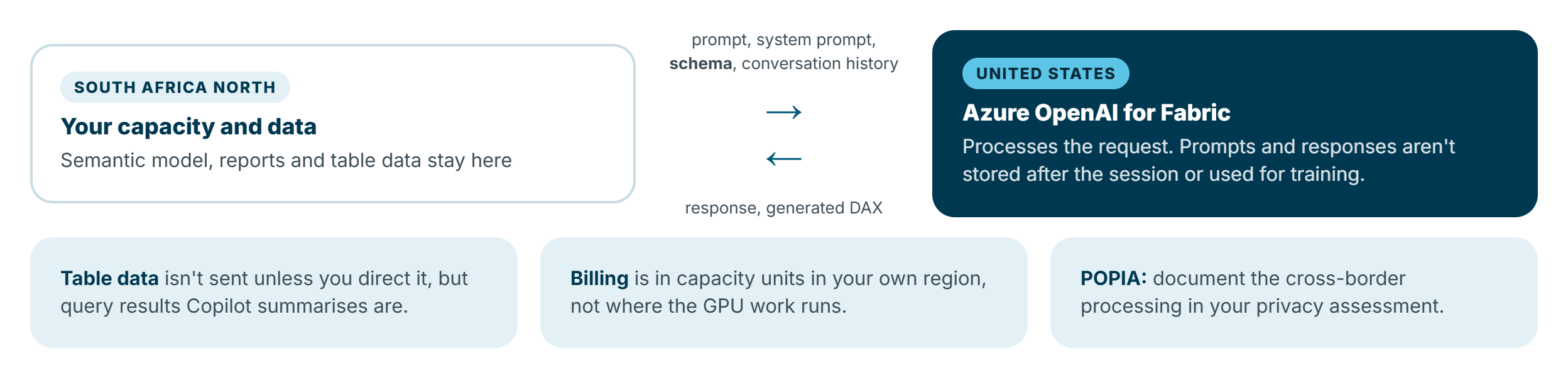
Copilot in Fabric runs on Azure OpenAI hosted in the US or the EU Data Boundary. Microsoft's documentation lists South Africa among the geographies whose prompts are processed in the US. So for South African tenants, Copilot won't work unless an admin also enables "Data sent to Azure OpenAI can be processed outside your capacity's geographic region, compliance boundary, or national cloud instance." This setting is off by default and can't be delegated to capacity admins.
What actually leaves the region: your prompt, the system prompt, the structure of your data (the schema) and the conversation history. Microsoft says table content isn't sent unless you direct it, but when Copilot summarises visuals or query results, that data is part of the request. Prompts and responses aren't stored after the session or used to train models, and billing is in capacity units in your own region.
Before you flip the switch, talk to whoever owns POPIA compliance in your organisation, and document the cross-border processing in your privacy impact assessment. It's usually approvable, but it should be a decision, not a surprise.
One more regional note: South Africa North supports Power BI and all Fabric workloads, while South Africa West is a Power BI-only region. If your capacity is in South Africa West, confirm Copilot is supported for your scenario before you plan a rollout around it.
Preparing a semantic model for Copilot
This is where report builders make the biggest difference. Microsoft's own guidance is blunt: instructions can't correct inaccurate relationships or inappropriate aggregations. Fix the model first.
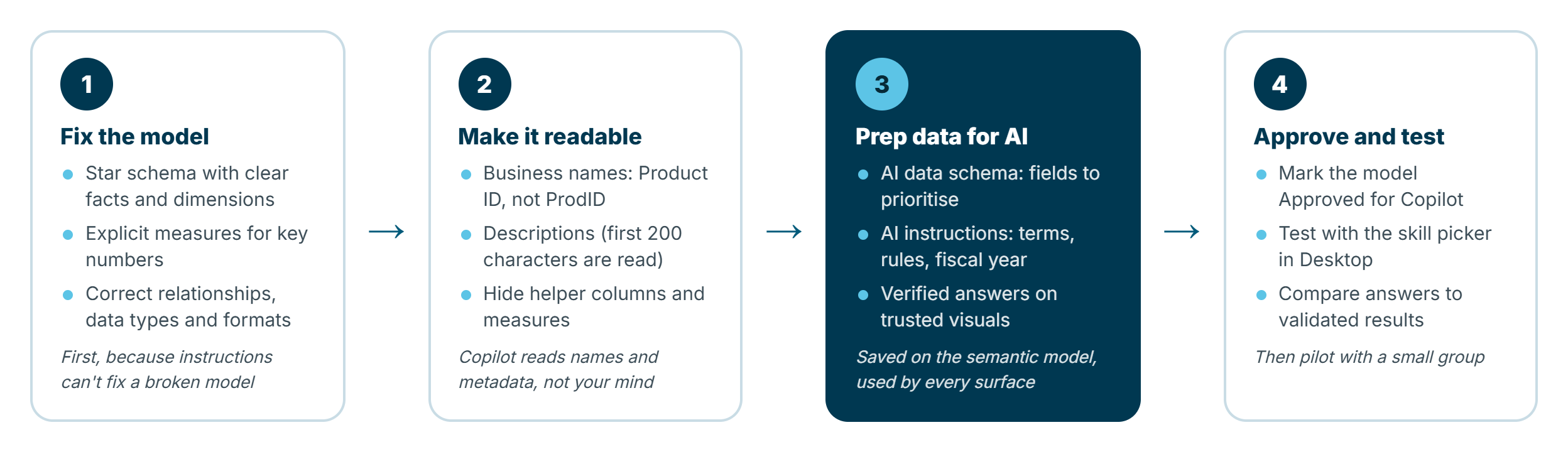
1. Fix the model
- Use a star schema with clear fact and dimension tables, and know the grain of each fact table.
- Create explicit measures for business-critical numbers (
[Net Sales]with returns handled), and calculate ratios from approved measures rather than averaging row-level percentages. - Check relationships (cardinality, active and inactive), data types and the Format property of measures.
- Give dates with different meanings their own columns (Order Date, Ship Date), and document your fiscal year.
2. Make it readable
Copilot reads names and metadata, not your mind. ProdID becomes Product ID; AvgRating becomes Average Customer Rating. Add descriptions to tables, columns and measures (Copilot reads the first 200 characters), hide helper columns and measures, and avoid duplicate measures that mean the same thing (Total Sales, Sales Amount and Revenue in one model will confuse people and Copilot alike).
3. Prep data for AI
Open Prep data for AI from the Home ribbon in Desktop, or from the semantic model in the service. It has three parts, all saved on the semantic model so every Copilot surface uses them:
- Simplify the data schema (AI data schema): choose which fields Copilot should prioritise when answering data questions. Note that report creation, search and DAX query Copilot use the whole model and ignore this selection.
- AI instructions: up to 10,000 characters of guidance about your business. Group them by theme. For example:
Metrics
- "Sales" or "revenue" means [Net Sales]. Never sum the SalesAmount column directly.
- "Margin" means [Gross Margin %].

Dates
- Our fiscal year runs from 1 March to 28/29 February. "This year" means the current fiscal year.
- Use Order Date unless the user asks about deliveries; then use Ship Date.

Terminology
- "Region" refers to Sales Region (Gauteng, Western Cape, KZN, Rest of SA), not Province.
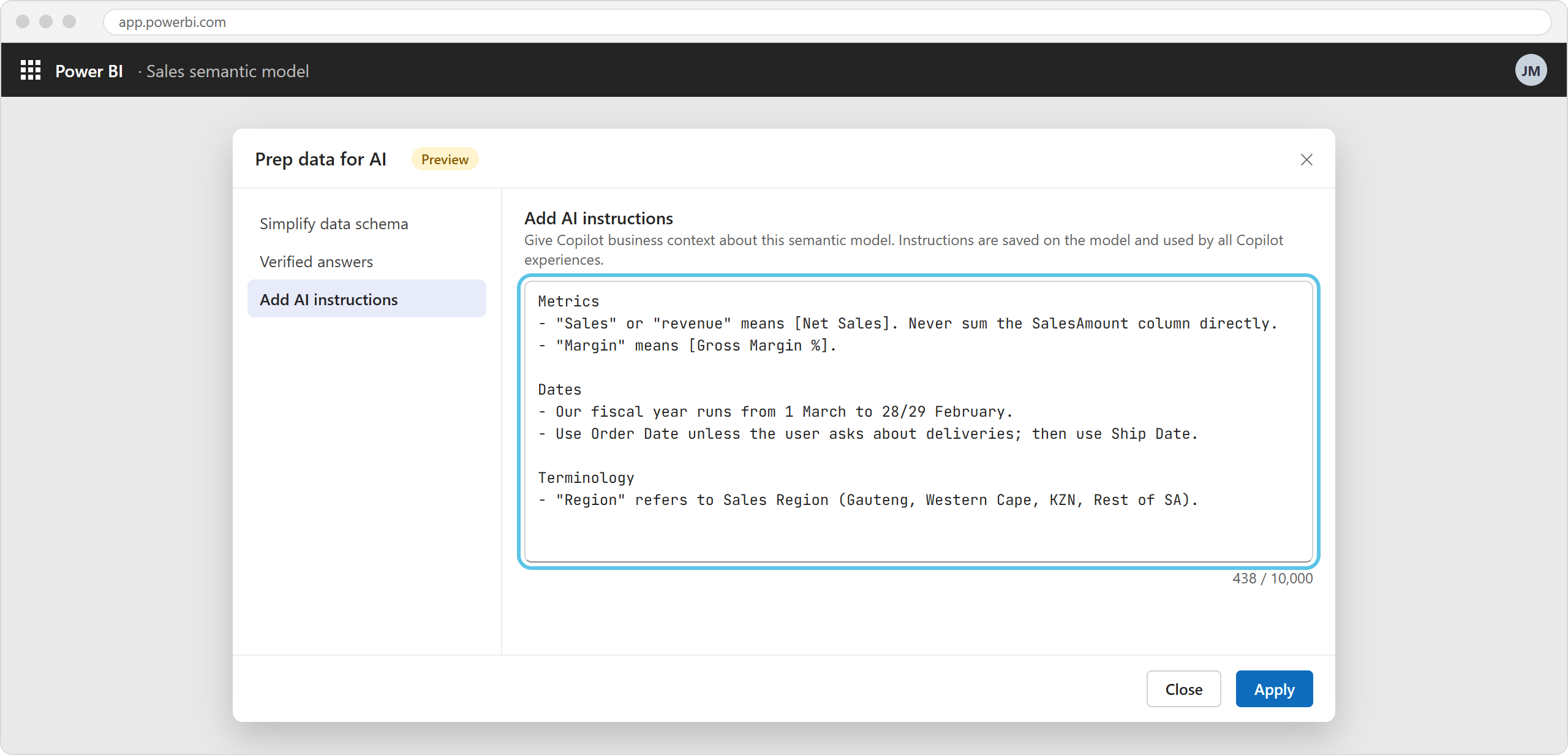
Illustration: the Prep data for AI dialog with AI instructions for a sales model. Your screen may look slightly different.
- Verified answers: select a trusted visual, choose Set up a verified answer, and add the trigger phrases people use ("sales by region this year"). When someone asks a matching question, Copilot returns your verified visual instead of generating one. Aim for five to seven phrasings per answer. They don't work with hidden fields, report-level measures, slicers or relative date filters, and they aren't a security feature.
4. Approve and test
In the service, open the semantic model's Settings and tick Approved for Copilot. This removes the warning in the standalone Copilot that answer quality may be low.
Then test properly. In Desktop's Copilot pane, the skill picker lets you simulate what different users get: Answer questions about the data (what standalone users get), Analyze report visuals and Create new report pages. Ask the questions your users will ask, compare answers to validated numbers, and use How Copilot arrived at this to see the DAX behind an answer. Close and reopen the pane after each change. Microsoft's own warning applies: don't interpret no result as zero.
What it can and can't do
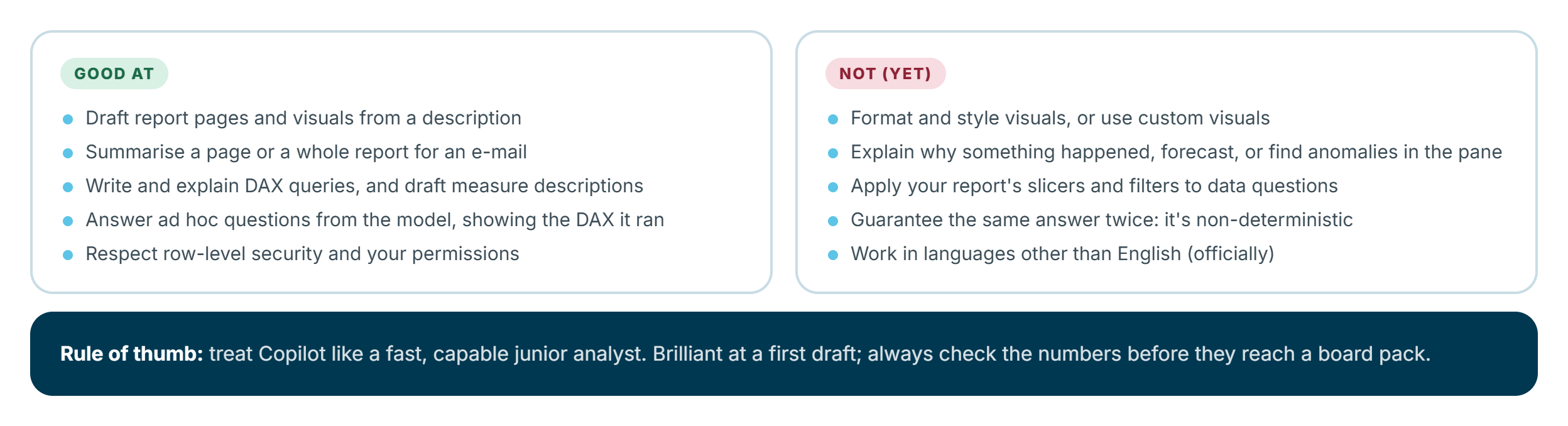
Where it shines: first drafts of report pages, summaries for e-mails and leadership updates, writing and explaining DAX, documenting measures, and quick ad hoc questions for people who would never open a matrix visual.
Where it falls short (today):
- Formatting and styling: Copilot doesn't change formatting or use custom visuals, and editing complex visuals can lose formatting. You'll still do the polish.
- "Why" questions: the data questions experience can't do anomaly detection, forecasting, key influencers or "why did sales drop in July?".
- Filters: data questions in the pane don't apply your report's filters and slicers, and summaries don't support every filter type (relative date filters, for example). A filtered page and a Copilot answer can disagree.
- Big visuals: summaries consider up to about 20 relevant visuals and get less accurate on tables over a few hundred rows; very large visuals are answered from the model instead.
- Model types: report creation doesn't work on live connections to Analysis Services, real-time streaming models, or models with implicit measures disabled.
- Language: multilingual use isn't officially supported. Write prompts in English.
- Consistency: AI output is non-deterministic. The same question can get a differently worded answer, and occasionally a different one.
The good news on security: Copilot respects row-level security and your permissions. If you can't see data in the report, prompting Copilot won't reveal it.
My rule of thumb: treat Copilot like a fast, capable junior analyst. Brilliant at a first draft, never the final word on a number that goes into a board pack.
What it costs in capacity
Copilot doesn't have a separate price. It consumes capacity units (CU) on the capacity it runs against, under the "Copilot in Fabric" operation.
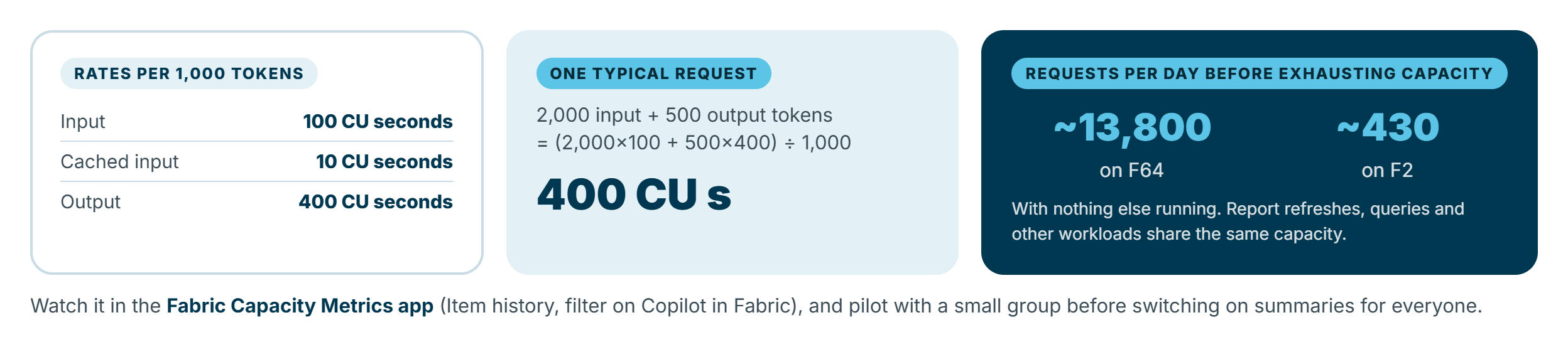
The rates are 100 CU seconds per 1,000 input tokens (10 for cached input) and 400 CU seconds per 1,000 output tokens. Microsoft's worked example is a request with 2,000 input and 500 output tokens, which costs 400 CU seconds. On an F64, that's over 13,800 such requests a day before the capacity is exhausted. By the same maths, an F2 manages about 430 a day, if nothing else is running on it.
Two practical implications:
- Small capacities fill up fast. Copilot is smoothed as a background job over 24 hours, but on an F2 that also runs refreshes and report queries, a keen team can exhaust it, and when a capacity is exhausted, everything on it is throttled.
- Pilot first. Microsoft's own advice is to try features like subscription summaries or narrative visuals on busy dashboards with a small group, measure the impact in the Fabric Capacity Metrics app (Item history, filtered to Copilot in Fabric), then scale. A dedicated Fabric Copilot capacity is a neat way to keep Copilot usage away from your production refreshes.
Getting started: my recommended path
- Check the basics: capacity (F2+ or P1+), tenant setting, and, in South Africa, the cross-geo decision with your privacy officer.
- Start with builders, not consumers. Turn on DAX query view Copilot and measure descriptions for your Power BI team first. They'll learn what Copilot gets right and wrong on your models.
- Pick one important model and give it the full treatment: star schema, business names, descriptions, Prep data for AI, verified answers for the top ten questions, and Approved for Copilot.
- Pilot the report pane and data questions with a small group of business users on that model, and watch capacity usage.
- Expand model by model. Copilot is only as good as the model behind it, so roll it out where the model is ready, not everywhere at once.
Summary
- Copilot in Power BI is a family of features: report creation, narratives, DAX query help and measure descriptions for builders; summaries, data questions and the standalone agent for consumers.
- It needs F2+ or P1+ capacity (or a Fabric Copilot capacity for Pro and PPU users), the right tenant settings and, for South African tenants, cross-geo processing.
- The model matters most. A clean star schema, clear names, descriptions and Prep data for AI do more for answer quality than clever prompts.
- Know the limits: no styling, no "why" questions, filters not always applied, English only, and non-deterministic answers.
- It costs capacity. Pilot, measure in the Capacity Metrics app, and keep Copilot away from production refreshes on small capacities.
Used well, Copilot doesn't replace report builders. It removes the blank-page problem and the "can you just pull this number for me?" requests, and leaves you more time for the modelling and design work that makes reports trustworthy. For more on Power BI modelling, see Power BI: Advanced Data Modeling for Enterprise.
Features, statuses and requirements reflect Microsoft's documentation as at October 2026. Copilot in Power BI changes monthly, so check the Power BI feature summaries for the latest.