Using UiPath and AWS for Automated Assessment
Anyone who has lectured a large, project-based module knows the feeling: the projects are where the real learning happens, and marking them is where your weekends go. Every submission has to be checked against a rubric, every rubric has to be populated, marks have to be captured and uploaded, and somewhere in between you're supposed to notice which students are quietly falling behind.
That's the problem behind a piece of research I've been working on, and the subject of my talk Using UiPath & AWS for Automated Assessment. In this post I'll walk through the journey: where the idea came from, how the architecture evolved, which technology stacks we compared, and what the numbers looked like at the end.
Background: project-based learning at scale
The teaching approach that kicked this off is IPCBL, which combines integrated, project-based and context-based learning:
- Integrated learning connects different academic disciplines, skills and experiences to promote deeper understanding and transferable skills.
- Project-based learning introduces students to real-world projects that develop essential knowledge and skills.
- Context-based learning uses real-world problems and challenges so students learn through practical application.
IPCBL brings all three together to get the benefits of each.
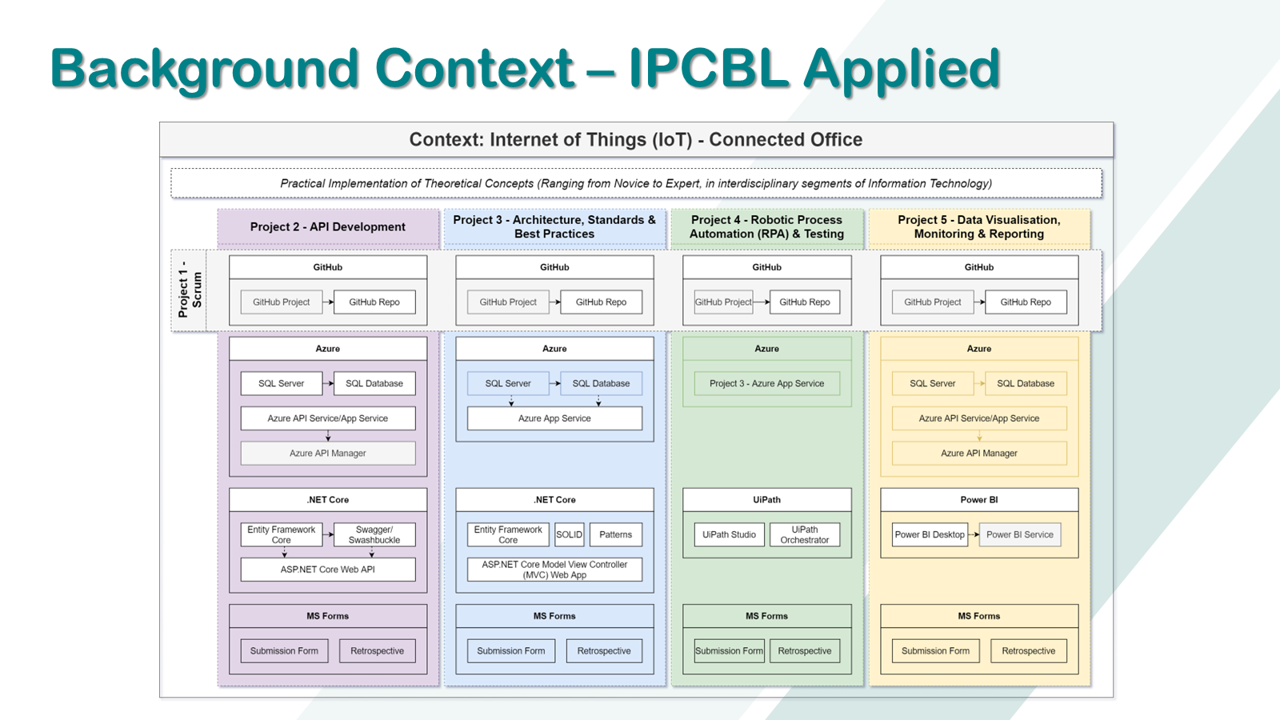
IPCBL applied: five projects, one shared context, many different technologies.
In practice, this meant a single context (for example, an Internet of Things "Connected Office") with five projects running through it: Scrum, API development, architecture and standards, RPA and testing, and data visualisation, monitoring and reporting. Each project touched different tools (GitHub, Azure, .NET Core, UiPath, Power BI, MS Forms) and each was linked to certifications students could earn along the way.
It's a great way to learn. It's also a lot of assessing.
Where the research is at
Earlier work focused on how to scope projects properly (identifying requirements, grouping and weighting them, and formulating a clear scope that refers to a rubric) and on using binary scales in rubrics to evaluate computer science assessments. Those steps (project brief, project scope and rubric criteria definition) became the foundation for automation.
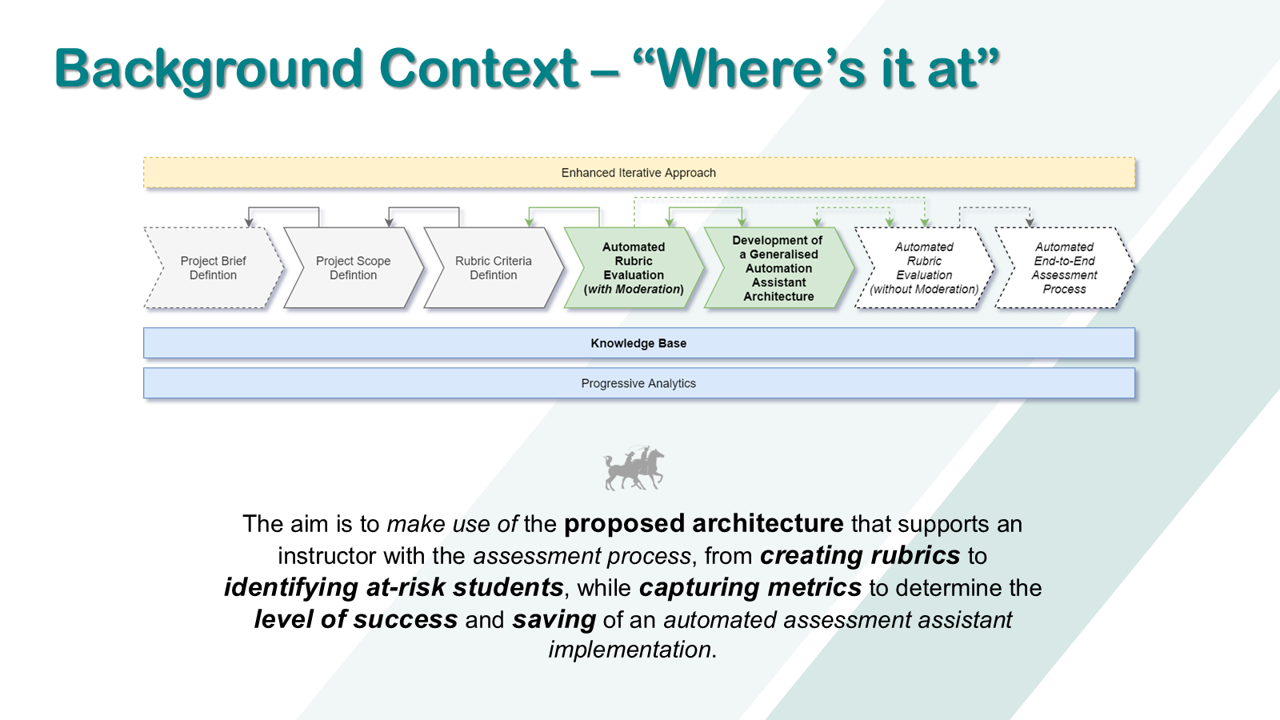
From manual definitions to automated rubric evaluation, with a knowledge base and progressive analytics underneath.
The aim is to use the proposed architecture to support an instructor through the assessment process, from creating rubrics to identifying at-risk students, while capturing metrics to determine the level of success and savings of an automated assessment assistant.
This isn't a new idea in principle. More than 100 automated assessment systems for programming assignments have been reported in the literature (Barra et al., 2020). Automated assessment systems drastically reduce teachers' workload, enabling them to give more assignments (Ala-Mutka, 2005), improve the consistency and objectivity of assessments (Paiva et al., 2022), and generate feedback that helps students improve their skills (Iddon et al., 2023).
What I wanted was an architecture that is instructor driven, uses pluggable open-source and vendor tools that are cost-effective and straightforward, and can assess far more than code: certificate uploads, sprint reports, database tables or elements of a GitHub project.
The challenges
Getting there meant answering a few tricky questions: which assignment types are suitable for automated assessment, which analysis methods give accurate and efficient results, which systems can support it, how feedback gets back to students and instructors, and how to integrate it all into the learning process without getting in the way.
The research followed a Design Science Research approach, balancing relevance (the people, processes and technology in the environment) with rigour (the existing knowledge base), and repeatedly developing, assessing and refining the artefact.
The approach: from rubric to at-risk student
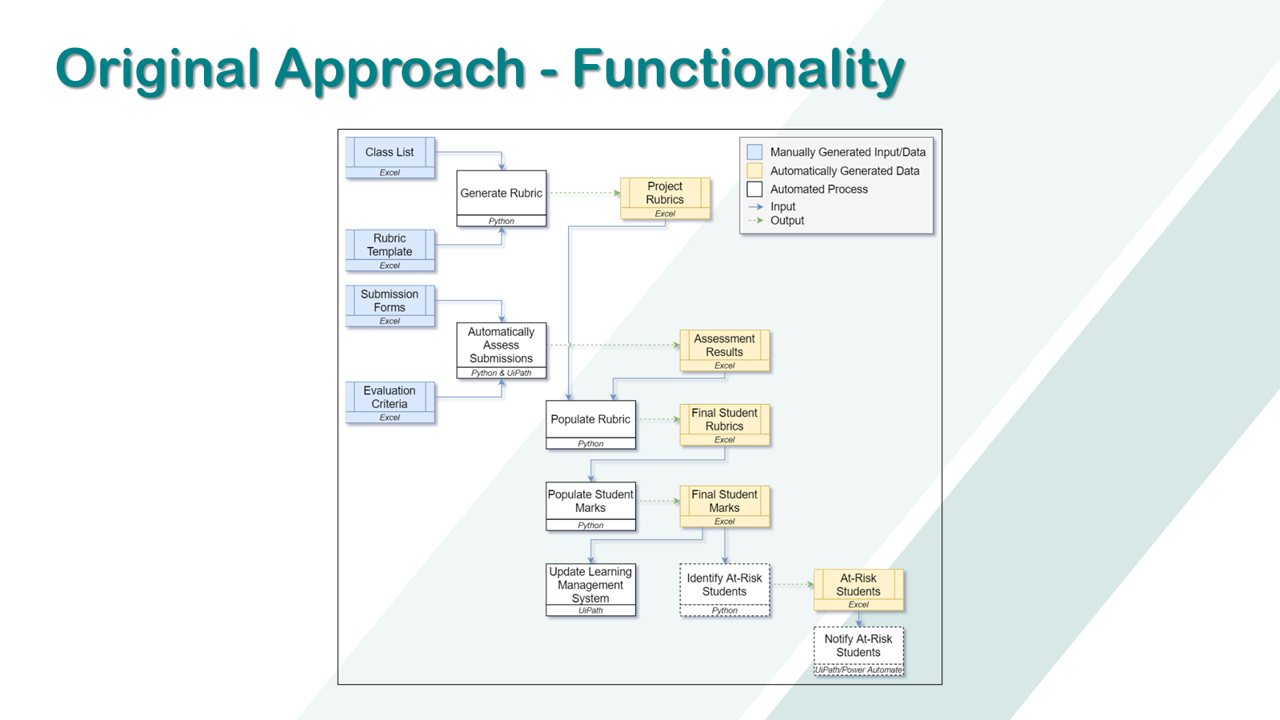
Manual inputs in blue, automatically generated data in yellow, automated processes in white.
The functional flow looks like this:
- A class list and rubric template are used to generate a rubric for every student.
- Submission forms and evaluation criteria feed the automated assessment of submissions (Python and UiPath).
- The assessment results populate each student's rubric, which in turn populate the student marks.
- Marks are uploaded to the learning management system (UiPath).
- Final marks are used to identify at-risk students, who can then be notified.
Architecturally, it's an object-oriented, data-centred style implemented as a 3-tier architecture using the repository pattern, split into a data layer (class lists, rubric templates, submissions, retrospective feedback and the generated rubrics and mark sheets), an integration layer (the functions that access submissions, create and populate rubrics, grade, upload marks and prompt for mark queries) and a presentation layer.
Comparing technology stacks
The proof of concept compared four stacks across the presentation, integration and data layers.
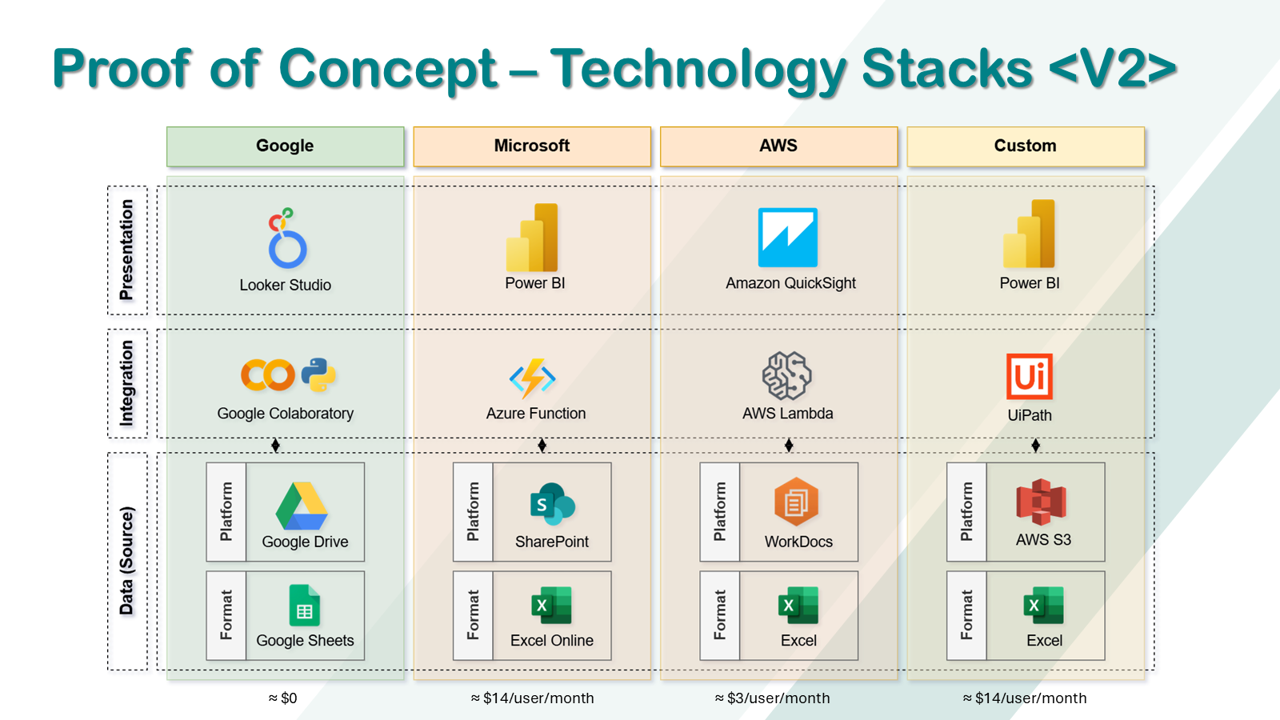
The V2 comparison: Google, Microsoft, AWS and a custom UiPath + AWS stack.
- Google: Looker Studio, Google Colaboratory (Python), Google Drive and Google Sheets – roughly $0
- Microsoft: Power BI, Azure Functions, SharePoint and Excel Online – roughly $14/user/month
- AWS: Amazon QuickSight, AWS Lambda, WorkDocs and Excel – roughly $3/user/month
- Custom: Power BI and UiPath, with data in Google Drive and Google Sheets in V1, moving to AWS S3 and Excel in V2 – roughly $14/user/month
The V1 custom implementation combined Google Colaboratory and UiPath for integration, with Google Sheets and Power BI for presentation. V2 swapped the data layer to AWS S3, giving us the UiPath and AWS combination in the title.
The results
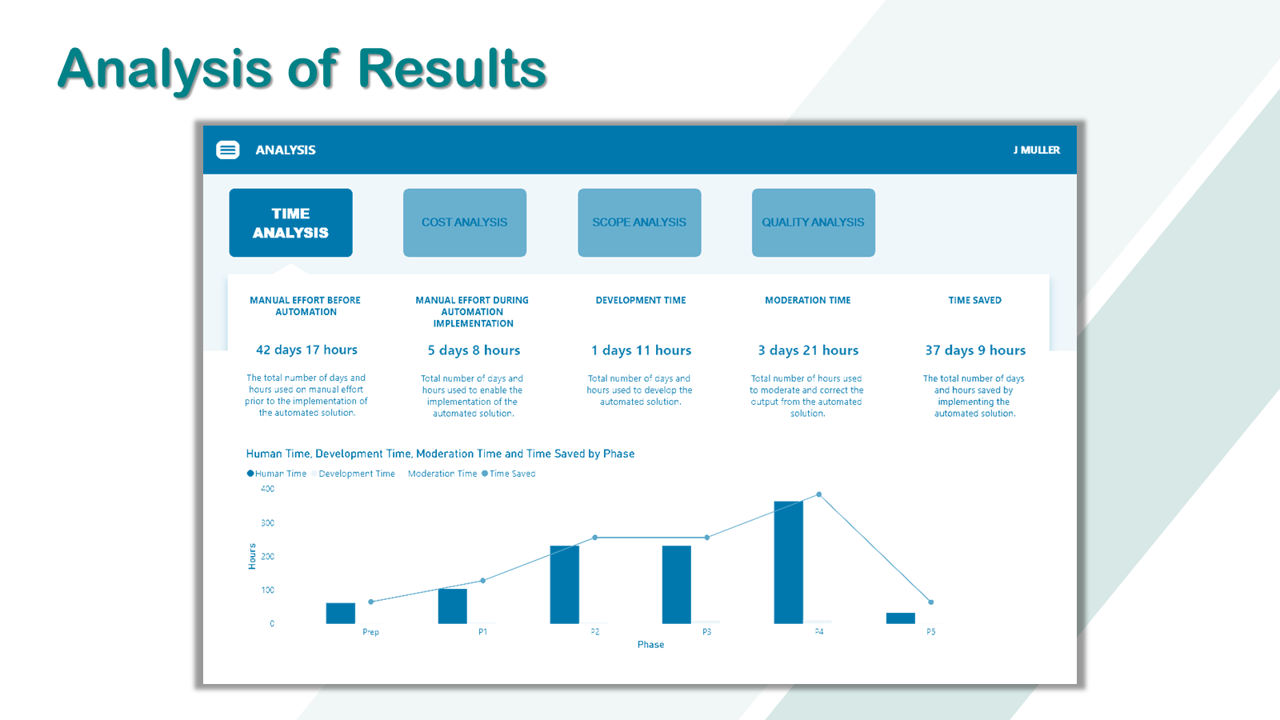
Time analysis across the preparation phase and five projects.
Before automation, manual assessment effort came to 42 days 17 hours (1 025 hours across the preparation phase and five projects). Here's how the three implementations compared on total time saved in the first iteration:
| Implementation | Development time (h) | Moderation time (h) | Total hours saved | Time saved |
|---|---|---|---|---|
| 35 | 93 | 897 | 37 days 9 hours | |
| Custom V1 | 19 | 18 | 1 116 | 46.5 days |
| Custom V2 (UiPath & AWS) | 19 | 18 | 1 190 | about 50 days |
With the Google implementation, manual effort after automation dropped to 5 days 8 hours in the first iteration. With the UiPath and AWS implementation, it was less than 2 days, and the expectation is roughly 25% less in each subsequent iteration.
What does that mean in money? Using R200 an hour as an example rate, the notes estimate savings of between R230 600 and R500 000 in the first year, depending on the seniority of the person who would otherwise be marking. With 50% less moderation and development cost, the saving would increase by roughly 8% in the second iteration and around 21% by the third. That's time that can go into research instead of admin.
The solution was evaluated against five criteria: improved constraints (time and cost), focused domain knowledge, improved consistency, improved efficiency at scale, and non-intrusivity for students. All five projects and the portfolio of evidence met all five criteria.
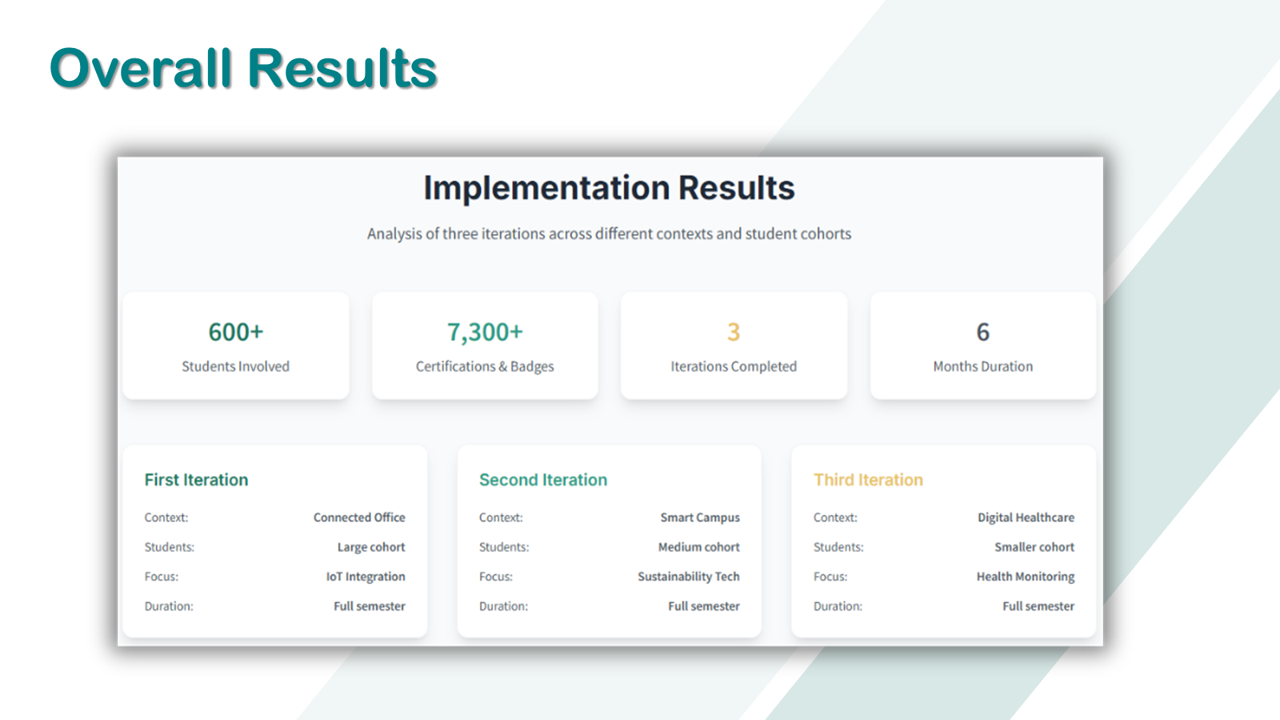
Three iterations, three contexts, 600+ students.
Across three iterations (Connected Office, Smart Campus and Digital Healthcare contexts, with large, medium and smaller cohorts), the implementation involved 600+ students and 7 300+ certifications and badges over six months.
What's next
Future iterations will focus on:
- Better analytics and metrics to extract new insights about student progress and success
- Alerting, so lecturers are notified when certain thresholds are reached and at-risk students are identified as close to real time as possible
- More audit logging, with more detail in the rubrics to reduce project queries
- Trialling other architectures and comparing the results
There are still challenges to watch: writing rubric criteria without ambiguity, choosing the right technology in each layer, the up-front development effort, and the wide variety of project queries.
Wrapping up
Automated assessment isn't about replacing lecturers. It's about taking the repetitive, admin-heavy parts of marking off their plate so they can spend time on feedback, on the students who need help, and on research. The combination of UiPath for the integration work and AWS for storage gave the biggest saving of the stacks we tried, but the bigger lesson is that a well-structured rubric is what makes any of it possible.
If you'd like to dig into the teaching framework behind this, have a look at the IPCBL framework.
References
- Ala-Mutka, K.M., 2005. A survey of automated assessment approaches for programming assignments. Computer Science Education, 15(2), pp.83–102.
- Barra, E., López-Pernas, S., Alonso, Á., Sánchez-Rada, J.F., Gordillo, A. and Quemada, J., 2020. Automated assessment in programming courses: A case study during the COVID-19 era. Sustainability, 12(18), p.7451.
- Iddon, C., Giacaman, N. and Terragni, V., 2023. GRADESTYLE: GitHub-Integrated and Automated Assessment of Java Code Style. In ICSE-SEET 2023, pp.192–197. IEEE.
- Muller, J. and Greeff, J.J., 2022. The Use of Binary Scales in Rubrics to Evaluate Computer Science Assessments. In Annual Conference of the Southern African Computer Lecturers' Association, pp.58–72. Springer.
- Paiva, J.C., Figueira, Á. and Leal, J.P., 2022. Automated Assessment in Computer Science: A Bibliometric Analysis of the Literature. In International Conference on Web-Based Learning, pp.122–134. Springer.